Table of Contents
- Overview
- Directory Structure
- Data File Format
- Transportability of data file
- Tile Data NULL-values
- Tile Data Compression
- Tile Cache
- Header File
- Region Structure
- Windows
- Masks
- Include File
- RASTER3D Defaults
- Cache Mode
- Compression
- Setting the precision
- Tiles
- Setting the tile cell-value type
- Setting the window
- Setting the Units
- Error Handling: Setting the error function
- RASTER3D Function Index
- Opening and Closing RASTER3D Files
- Reading and Writing Tiles
- Reading and Writing Cells
- and Removing Tiles
- Write Functions used in Cache Mode
- and Unlocking Tiles, and Cycles
- Reading Volumes
- Allocating and Freeing Memory
- RASTER3D Null Value Support
- RASTER3D Map Header Information
- RASTER3D Tile Math
- RASTER3D Range Support
- RASTER3D Color Support
- RASTER3D Categories Support
- RASTER3D History Support
- RASTER3D Mask Support
- RASTER3D Window Support
- RASTER3D Region
- Miscellaneous Functions
- Sample RASTER3D Applications
TODO: Update for this page for GRASS 7, most of the function names have been changed from camel case to gnu underscore style.
Overview
The 3D Raster Volume Library is used for the r3.* and vector volume tools. The library uses a tile cache based approach to store floating point values in arbitrary order in a volume. The coordinate system of a volume is column and row compatible to the raster library and counts from the bottom to the top of the cube.
Random reading and writing is supported until are tiles are flushed to the disk. In case the tiles are written to the disk, random reading is still supported.
The size of the tile cache in memory can be set in bytes using the environmental variable RASTER3D_MAX_CACHE_SIZE. Default size is 16777216 bytes.The number of tiles hold in memory can be specified with the environmental variable RASTER3D_DEFAULT_CACHE_SIZE. Default is 1000.
Directory Structure
The file format consists of a mapset element grid3 which contains a directory for every map. The elements for each map are
        3d region file
        color file (color)
        categories file (cats)
        range file (range)
        timestamp file
        cell file (cell)
        header file (cellhd)
        a directory containing display files (dsp)
There is also a colr2 mechanism provided. colr2 color tables are stored in grid3/colr2/MAPSET/MAP.
Note: color, categories, and the range can be used in the same way as in 2d GRASS with the exception of reading and writing. 3d read and write functions have to be used for this purpose.
Data File Format
- Cell-values can be either double or float.
- Values are written in XDR-format.
- NULL-values are stored in an embedded fashion.
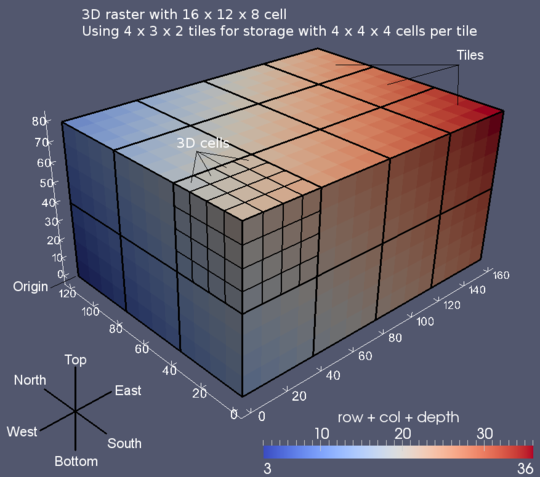
- The cell-values are organized in 3d-tiles.
- The tile dimensions can be chosen when a new map is opened.
- Every tile of a map has the same dimension except those which overlap the region boundaries.
- Compression is used to store tiles.
The data file has the following format:
        xdr_int nofBytesLong;
        xdr_int nofBytesUsed;
        encoded_long indexOffset;
        compressed_tile[] tiles;
        compressed_encoded_long[] index;
Transportability of data file
All numbers stored in the data file are either XDR-encoded or encoded by some other method (for variables of type long only).
Tile Data NULL-values
RASTER3D uses the same functions as 2d GRASS to set and test NULL-values. The storage in the file is different though. NULL-values are stored with a special bit-pattern if maximum precision is chosen. They are stored by adding an additional bit if the precision is smaller.
Tile Data Compression
NOTE: RLE compression was removed because of error-prone implementation. De-compression is still available for backward compatibility.
Default compression is now zip.
There are three methods of compression provided. The compression methods can either be those defined by default, set by environment variables or explicitly set at run-time.
        Precision
        zlib
Precision indicates how many of the mantissa bits should be stored on file. This number can be any value between 0 and 23 for floats and between 0 and 52 for doubles. Choosing a small precision is the most effective way to achieve good compression.
The default and suggested setting is to use precision and zlib.
Additional compression is achieved by storing the extra NULL-bit in a separate bit-array. Using this scheme NULL-values need not actually be represented in the array of cell values. This array is stored together with the cell-values of the tile.
Tile Cache
Tiles can either be read and written directly or use an intermediate cache instead.
In non-cache mode the application should only use the functions
int Rast3d_readTile()
and
int Rast3d_writeTile()
to read and write tiles. The application can use one tile provided by the map structure as buffer. See Rast3d_getTilePtr().
In cache mode the application can access cell-values directly by their coordinates. The corresponding functions are
and
and their corresponding typed versions.
If the map is new then in addition to the memory-cache a file-cache is provided. This allows the application to write the cell-values in any arbitrary order. Tiles are written (flushed) to the data-file either at closing time or if explicitly requested.
If the map is new Rast3d_get_value() can be used even if the tile which contains the cell has already been flushed to the data file. In this case the tile is simply read back into the memory-cache from the data file.
Explicitly flushing tiles can have the advantage that less disk space is occupied since tiles are stored in a uncompressed fashion in the file-cache. Flushing tiles explicitly can cause problems with accuracy though if precision is less than the maximum precision and an already flushed value is used for computations later in the program.
The type of the cell-values of the tiles in memory can be chosen independently of the type of the tiles in the file. Here, once again one has to consider possible problems arising from mixing different precisions.
As an example consider the case where the data is stored in the file with double precision and the tiles are stored in memory in single precision. Then using Rast3d_get_value() will actually return a double precision number whose precision is only 23 bits. It is therefore a good idea to use the types in the memory consistently.
Header File
The header file has the following format:
Proj: 1
Zone: 1
North: 2.0000000000000
South: 0.5000000000000
East: 4.0000000000000
West: 3.0000000000000
Top: 6.0000000000000
Bottom: 5.0000000000000
nofRows: 30
nofCols: 20
nofDepths: 14
e-w resol: 0.05
n-s resol: 0.05
t-b resol: 0.071428571
TileDimensionX: 8
TileDimensionY: 8
TileDimensionZ: 8
CellType: double
useCompression: 1
useRle: 1
Precision: -1
nofHeaderBytes: 12
useXdr: 1
hasIndex: 1
Units: none
VerticalUnits: 1
Except for the first 14 fields the entries of the header file should not be modified. The precision value -1 indicates that maximum precision is used.
Binary files not in RASTER3D format can be read by the library. The following actions have to be taken:
Make a new map directory in the grid3 element of the mapset (say mymap). Copy the file into mymap/cell and generate a header file mymap/cellhd.
In the following example the relevant values of mymap/cellhd are shown:
TileDimensionX: A
TileDimensionY: B
TileDimensionZ: C
useCompression: 0
useRle: 0
Precision: -1
nofHeaderBytes: X
useXdr: 0
hasIndex: 0
The values of A, B, and C have to be chosen according to one of the following patterns:
A >= 1, B == 1, C == 1, or
A >= nofRows, B >= 1, C == 1, or
A >= nofRows, B >= nofCols, C >= 1.
A larger tile size reduces the number of tile-reads. If in the third pattern C is chosen larger than or equal to nofDepths, the entire region is considered one large tile.
The value nofHeaderBytes indicates the offset in the file to the first data entry.
For performance reasons it is a good idea to use function Rast3d_retile() before using the file in other applications.
Region Structure
typedef struct{

    double north, south;
    double east, west;
    double top, bottom;

    int rows, cols, depths; // data dimensions in cells

    double ns_res, ew_res, tb_res;

    int proj;  // Projection (see gis.h)
    int zone;  // Projection zone (see gis.h)

} RASTER3D_Region;
Windows
Window capability similar to that of 2d GRASS is provided (compare Region). Additional features are the window for the third dimension as well as the possibility to choose a different window for every map. The window can be specified at the time of opening an old map. It can be modified at any time later in the program. The resampling method can be the default nearest neighbor method as well as an application provided method.
The default 3d window file is WIND3 located in the mapset. Application programs should use Rast3d_useWindowParams() to allow the user to overwrite this default.
The window file has the following format:
Proj: 1
Zone: 1
North: 2.0
South: 0.5
East: 4.0
West: 3.0
Top: 5.0
Bottom: 6.0
nofRows: 30
nofCols: 20
nofDepths: 14
e-w resol: 0.05000000000000000
n-s resol: 0.05000000000000000
t-b resol: 0.07142857142857142
Note: after reading the window file the fields e-w, n-s, and t-b are recomputed internally.
A note about windows and caching. Caching is performed on the level of tiles read from the file. There is no caching performed on resampled data. This is different from 2d GRASS since resampling for a specific value is performed every time it is being accessed.
Masks
RASTER3D provides a mask for the 3d region. The mask structure is automatically initialized at the time the first file is opened. The same structure is used for all the files. The default for every file is that the mask is turned off. If masking should be performed, the application program has to turn on masking explicitly. If masking is turned on for a file, the cell-values of a tile are automatically checked against the mask. Values which are masked out, are set to NULL.
Note: changing the status of masking after one or more tiles have already been read does not affect the tiles which are already stored in the cache.
Any arbitrary 3d raster map can be used as mask file: NULL-values are interpreted as "mask-out", all other values are interpreted as "don't mask
out". Using r3.mask to convert a 3d raster map into a mask file instead of simply copying (or renaming) the directory will significantly reduce to amount of disk space and the access time for the mask.
Include File
Exported RASTER3D constants and structures can be found in raster3d.h.
RASTER3D Defaults
There are three methods to set default variables. First, the default can be set at compile time in g3ddefault.c. This value has lowest priority.
Second, the default can be set via an environment variable. Third, the value can be set explicitly set at run time. This value has highest priority.
There are also functions provided to query the value.
Cache Mode
Limiting the maximum cache size
The limit is specified in bytes. It is a limit on the size of cell-data stored in the cache and does not include the support structure.
Default RASTER3D_CACHE_SIZE_MAX_DEFAULT. This is currently set to 16meg and can be changed at compilation time of the library.
Environment variable RASTER3D_MAX_CACHE_SIZE.
void Rast3d_setCacheLimit(int nBytes)Set cache limit
int Rast3d_getCacheLimit(int nBytes)Get cache limit
Setting the cache size
This value specifies the number of tiles stored in the cache. It is the value used if at opening time of a map RASTER3D_USE_CACHE_DEFAULT is used for the cache mode. Any other value used at opening time will supersede the default value. A default value of 0 indicates that non-cache mode should be used by default.
Default RASTER3D_CACHE_SIZE_DEFAULT. This is currently set to 1000 and can be changed at compilation time of the library.
Environment variable RASTER3D_DEFAULT_CACHE_SIZE.
void Rast3d_setCacheSize(int nTiles)
int Rast3d_getCacheSize()
Compression
Toggling compression mode
This value specifies whether compression should be used while writing a new map. It does not have any effect on old maps.
Default RASTER3D_COMPRESSION_DEFAULT. This is set to RASTER3D_COMPRESSION. This default should not be changed.
Environment variables RASTER3D_USE_COMPRESSION and RASTER3D_NO_COMPRESSION.
See functions Rast3d_setCompressionMode() (cf. Section 22.3.2.3 ) and Rast3d_getCompressionMode() (cf. Section 22.3.2.3 ).
Toggling RLE compression
NOTE: RLE compression is not used any longer, the RLE code is still present to assure backward compatibility. G_zlib_write() and G_zlib_read() are used for compression now.
This value specifies whether RLE compression should be used (in addition to precision).
Default RASTER3D_USE_RLE_DEFAULT. This is currently set to RASTER3D_USE_RLE and can be changed at compilation time of the library.
Environment variables RASTER3D_USE_RLE and RASTER3D_NO_RLE.
See functions Rast3d_setCompressionMode() (cf. Section 22.3.2.3) and Rast3d_getCompressionMode() (cf. Section 22.3.2.3).
Setting the precision
This number specifies how many mantissa bits should be used when writing a cell value. The minimum value is 0. The maximum value is 23 or RASTER3D_MAX_PRECISION for type FCELL_TYPE, it is 52 or RASTER3D_MAX_PRECISION for type DCELL_TYPE.
Default RASTER3D_PRECISION_DEFAULT. This is set to RASTER3D_MAX_PRECISION. This default should not be changed.
Environment variables RASTER3D_PRECISION and RASTER3D_MAX_PRECISION.
void Rast3d_setCompressionMode(int doCompress, int doLzw, int doRle, int precision) doCompress should be one of RASTER3D_NO_COMPRESSION and RASTER3D_COMPRESSION, doRle should be either RASTER3D_NO_RLE or RASTER3D_USE_RLE, and precision should be either RASTER3D_MAX_PRECISION or a positive integer.
void Rast3d_getCompressionMode(int *doCompress, int *doLzw, int *doRle, int *precision)
Tiles
Setting the tile dimensions
The dimensions are specified in number of cell.
Defaults RASTER3D_TILE_X_DEFAULT, RASTER3D_TILE_Y_DEFAULT, and RASTER3D_TILE_Z_DEFAULT. These are currently set to 8 and can be changed at compilation time of the library.
Environment variables RASTER3D_TILE_DIMENSION_X, RASTER3D_TILE_DIMENSION_Y, and RASTER3D_TILE_DIMENSION_Z.
void Rast3d_setTileDimension(int tileX, int tileY, int tileZ)
void Rast3d_getTileDimension(int *tileX, int *tileY, int *tileZ)
Setting the tile cell-value type
Specifies which type is used to write cell-values on file. This type can be chosen independently of the type used to store cell-values in memory.
Default RASTER3D_FILE_TYPE_DEFAULT. This is set to DCELL_TYPE. This default should not be changed.
Environment variables RASTER3D_WRITE_FLOAT and RASTER3D_WRITE_DOUBLE.
void Rast3d_setFileType(int type)
int Rast3d_getFileType(int type)
Setting the window
The window is set from a 3d window file.
The default 3d window file is WIND3 located in the current mapset.
Possible choices for 3d window files are name which refers to a window file in the 3d window database located at windows3d of the current mapset; or file names which are identified by a leading "/" or "."; or fully qualified names, i.e. file which refer to window files in the 3d window database of mapset. Note, that names WIND3 and WIND3 do not specify the default window name in the (current) mapset but rather a window file in the window database of the (current) mapset.
Environment variable RASTER3D_DEFAULT_WINDOW3D.
See functions
Rast3d_useWindowParams(),
Rast3d_setWindow(), and
Rast3d_setWindowMap().
Setting the Units
The data untis of a map can be described using a string. The vertical units are defined in gis.h and can be spatial or temporal.
No environment variable.
void Rast3d_set_unit (map, unit)
        RASTER3d_Map; // the map
        char *unit; // The data unit description

void Rast3d_set_vertical_unit (map, unit)
        RASTER3d_Map; // the map
        char *unit;  // Use the standard from units.c in lib/gis
void Rast3d_set_vertical_unit2 (map, unit)
        RASTER3d_Map; // the map
        int unit; // defined in gis.h
Error Handling: Setting the error function
This variable specifies the function which is invoked when an error (not a fatal error) occurs. For example setting the error function to Rast3d_fatalError simplifies debugging with dbx and also might show errors which are missed because the application does not check the return value.
Default Rast3d_skipError.
Environment variables RASTER3D_USE_FATAL_ERROR and RASTER3D_USE_PRINT_ERROR.
void Rast3d_setErrorFun(void (*fun)(char *))
The following 3 functions are possible choices for error functions.
void Rast3d_skipError(char (*msg)(char *)) This function ignores the error.
void Rast3d_printError(char (*msg)(char *)) This function prints the error message msg to stderr and returns.
void Rast3d_fatalError(char (*msg)(char *)) This function prints the error message msg to stderr, flushes stdout and stderr, and terminates the program with a segmentation fault.
RASTER3D Function Index
Opening and Closing RASTER3D Files
void *Rast3d_openCellOld(char *name, char *mapset, RASTER3D_Region *window, int type, int cache)Opens existing g3d-file name in mapset.
Tiles are stored in memory with type which must be any of FCELL_TYPE, DCELL_TYPE, or RASTER3D_TILE_SAME_AS_FILE. cache specifies the cache-mode used and must be either RASTER3D_NO_CACHE, RASTER3D_USE_CACHE_DEFAULT, RASTER3D_USE_CACHE_X, RASTER3D_USE_CACHE_Y, RASTER3D_USE_CACHE_Z, RASTER3D_USE_CACHE_XY, RASTER3D_USE_CACHE_XZ, RASTER3D_USE_CACHE_YZ, RASTER3D_USE_CACHE_XYZ, the result of Rast3d_cacheSizeEncode() (cf. Section 22.4.6), or any positive integer which specifies the number of tiles buffered in the cache. window sets the window-region for the map. It is either a pointer to a window structure or RASTER3D_DEFAULT_WINDOW, which uses the window stored at initialization time or set via Rast3d_setWindow() (cf. Section 22.4.16). To modify the window for the map after it has already been opened use Rast3d_setWindowMap() (cf. Section 22.4.16).
Returns a pointer to the cell structure ... if successful, NULL ... otherwise.
void *Rast3d_openCellNew(char *name, int type, int cache, RASTER3D_Region region)Opens new g3d-file with name in the current mapset. Tiles are stored in memory with type which must be one of FCELL_TYPE, DCELL_TYPE, or RASTER3D_TILE_SAME_AS_FILE. cache specifies the cache-mode used and must be either RASTER3D_NO_CACHE, RASTER3D_USE_CACHE_DEFAULT, RASTER3D_USE_CACHE_X, RASTER3D_USE_CACHE_Y, RASTER3D_USE_CACHE_Z, RASTER3D_USE_CACHE_XY, RASTER3D_USE_CACHE_XZ, RASTER3D_USE_CACHE_YZ, RASTER3D_USE_CACHE_XYZ, the result of Rast3d_cacheSizeEncode() (cf. Section 22.4.6), or any positive integer which specifies the number of tiles buffered in the cache. region specifies the 3d region.
Returns a pointer to the cell structure ... if successful, NULL ... otherwise.
void *Rast3d_openCellNewParam(char *name, int typeIntern, int cache, RASTER3D_Region *region, int type, int doLzw, int doRle, int precision, int tileX, int tileY, int tileZ)Opens new g3d-file with name in the current mapset. Tiles are stored in memory with typeIntern which must be one of FCELL_TYPE, DCELL_TYPE, or RASTER3D_TILE_SAME_AS_FILE. cache specifies the cache-mode used and must be either RASTER3D_NO_CACHE, RASTER3D_USE_CACHE_DEFAULT, RASTER3D_USE_CACHE_X, RASTER3D_USE_CACHE_Y, RASTER3D_USE_CACHE_Z, RASTER3D_USE_CACHE_XY, RASTER3D_USE_CACHE_XZ, RASTER3D_USE_CACHE_YZ, RASTER3D_USE_CACHE_XYZ, the result of Rast3d_cacheSizeEncode() (cf. Section 22.4.6), or any positive integer which specifies the number of tiles buffered in the cache. region specifies the 3d region.
In addition the properties of the new file have to be specified. It is assumed by default that compression is used. This function first sets the global default values to the specified values, and then restores the original global defaults. This function can be used in conjunction with Rast3d_setStandard3dInputParams() (cf. Section 22.4.18) and Rast3d_getStandard3dParams().
Returns a pointer to the cell structure ... if successful, NULL ... otherwise.
int Rast3d_closeCell(void *map)Closes g3d-file. If map is new and cache-mode is used for map then every tile which is not flushed before closing is flushed.
Returns 1 ... if successful, 0 ... otherwise.
void *Rast3d_open_new_opt_tile_size(const char *name, int cache, RASTER3D_Region * region, int type, int maxSize)
Opens new g3d-file with name in the current mapset. This method tries to compute optimal tile size based on the number of rows, cols and depths and the maximum allowed tile size in KB. Tiles are stored in memory using RASTER3D_TILE_SAME_AS_FILE method. cache specifies the cache-mode used and must be either RASTER3D_NO_CACHE, RASTER3D_USE_CACHE_DEFAULT, RASTER3D_USE_CACHE_X, RASTER3D_USE_CACHE_Y, RASTER3D_USE_CACHE_Z, RASTER3D_USE_CACHE_XY, RASTER3D_USE_CACHE_XZ, RASTER3D_USE_CACHE_YZ, RASTER3D_USE_CACHE_XYZ, the result of Rast3d_cache_size_encode () (cf.{g3d:G3d.cacheSizeEncode}), or any positive integer which specifies the number of tiles buffered in the cache. region specifies the 3d region. The map is created using the type which must be of FCELL_TYPE or DCELL_TYPE.
Returns a pointer to the cell structure ... if successful, NULL ... otherwise.
Reading and Writing Tiles
These functions read or write data directly to the file (after performing the appropriate compression) without going through the cache. In order to avoid unexpected side-effects the use of these functions in cache mode is discouraged.
int Rast3d_readTile(void *map, char *tileIndex, int tile, int type) Reads tile with index tileIndex into the tile buffer. The cells are stored with type type which must be one of FCELL_TYPE and DCELL_TYPE. If the tile with tileIndex is not stored on the file corresponding to map, and tileIndex is a valid index tile is filled with NULL-values.
Returns 1 ... if successful, 0 ... otherwise.
int Rast3d_readTileFloat(void *map, char *tileIndex, int tile) Is equivalent to Rast3d_readTile (map, tileIndex, tile, FCELL_TYPE).
int Rast3d_readTileDouble(void *map, char *tileIndex, int tile) Is equivalent to Rast3d_readTile (map, tileIndex, tile, DCELL_TYPE).
int Rast3d_writeTile(void *map, char *tileIndex, int tile, int type) Writes tile with index tileIndex to the file corresponding to map. It is assumed that the cells in tile are of type which must be one of FCELL_TYPE and DCELL_TYPE. The actual type used to write the tile depends on the type specified at the time when map is initialized.
A tile can only be written once. Subsequent attempts to write the same tile are ignored.
Returns 1 ... if successful, 2 ... if write request was ignored, 0 ... otherwise.
int Rast3d_writeTileFloat(void *map, char *tileIndex, int tile) Is equivalent to Rast3d_writeTile (map, tileIndex, tile, FCELL_TYPE).
int Rast3d_writeTileDouble(void *map, char *tileIndex, int tile) Is equivalent to Rast3d_writeTile (map, tileIndex, tile, DCELL_TYPE).
Reading and Writing Cells
void Rast3d_getValue(void *map, int x, int y, int z, char *value, int type) Returns in *value the cell-value of the cell with window-coordinate (x, y, z). The value returned is of type.
This function invokes a fatal error if an error occurs.
float Rast3d_getFloat(void *map, int x, int y, int z)Is equivalent to Rast3d_getValue (map, x, y, z, &value, FCELL_TYPE); return value.
double Rast3d_getDouble(void *map, int x, int y, int z)Is equivalent to Rast3d_getValue (map, x, y, z, &value, DCELL_TYPE); return value.
void Rast3d_getValueRegion(void *map, int x, int y, int z, char*value, int type) Returns in *value the cell-value of the cell with region-coordinate (x, y, z). The value returned is of type. Here region means the coordinate in the cube of data in the file, i.e. ignoring geographic coordinates.
This function invokes a fatal error if an error occurs.
float Rast3d_getFloatRegion(void *map, int x, int y, int z)Is equivalent to Rast3d_getValueRegion (map, x, y, z, &value, FCELL_TYPE); return value.
is equivalent to
int Rast3d_putValue(void *map, int x, int y, int z, char *value, int type)After converting *value of type into the type specified at the initialization time (i.e. typeIntern) this function writes the value into the tile buffer corresponding to cell-coordinate (x, y, z).
Returns
1 ... if successful, 0 ... otherwise.
int Rast3d_putFloat(void *map, int x, int y, int z, char *value)Is equivalent to Rast3d_putValue (map, x, y, z, &value, FCELL_TYPE).
int Rast3d_putDouble(void *map, int x, int y, int z, char *value) Is equivalent to Rast3d_putValue (map, x, y, z, &value, DCELL_TYPE).
and Removing Tiles
char *Rast3d_getTilePtr(void *map, int tileIndex) This function returns a pointer to a tile which contains the data for the tile with index tileIndex. The type of the data stored in the tile depends on the type specified at the initialization time of map. The functionality is different depending on whether map is old or new and depending on the cache-mode of map.
If map is old and the cache is not used the tile with tileIndex is read from file and stored in the buffer provided by the map structure. The pointer to this buffer is returned. If the buffer already contains the tile with tileIndex reading is skipped. Data which was stored in earlier calls to Rast3d_getTilePtr is destroyed. If the tile with tileIndex is not stored on the file corresponding to map, and tileIndex is a valid index the buffer is filled with NULL-values.
If map is old and the cache is used the tile with tileIndex is read from file and stored in one of the cache buffers. The pointer to buffer is returned. If no free cache buffer is available an unlocked cache-buffer is freed up and the new tile is stored in its place. If the tile with tileIndex is not stored on the file corresponding to map, and tileIndex is a valid index the buffer is filled with NULL-values. If one of the cache buffers already contains the tile with tileIndex reading is skipped and the pointer to this buffer is returned.
If map is new and the cache is not used the functionality is the same as if map is old and the cache is not used. If the tile with tileIndex is already stored on file, it is read into the buffer, if not, the cells are set to null-values. If the buffer corresponding to the pointer is used for writing, subsequent calls to Rast3d_getTilePtr may destroy the values already stored in the buffer. Use Rast3d_flushTile to write the buffer to the file before reusing it for a different index. The use of this buffer as write buffer is discouraged.
If map is new and the cache is used the functionality is the same as if map is old and the cache is used with the following exception. If tileIndex is a valid index and the tile with this index is not found in the cache and is not stored on the file corresponding to map, then the file cache is queried next. If the file-cache contains the tile it is loaded into the cache (memory-cache). Only if the file-cache does not contain the tile it is filled with NULL-values. Tile contents of buffers are never destroyed. If a cache buffer needs to be freed up, and the tile stored in the buffer has not been written to the file corresponding to map yet, the tile is copied into the file-cache.
Care has to be taken if this function is used in non-cache mode since it is implicitly invoked every time a read or write request is issued. The only I/O-functions for which it is safe to assume that they do not invoke Rast3d_getTilePtr are Rast3d_readTile() and Rast3d_writeTile() and their corresponding type-specific versions.
Returns a pointer to a buffer ... if successful, NULL ... otherwise.
int Rast3d_tileLoad(void *map, int tileIndex) Same functionality as Rast3d_getTilePtr() but does not return the pointer.
Returns 1 ... if successful, 0 ... otherwise.
int Rast3d_removeTile(void *map, inttileIndex) Removes a tile from memory-cache if tile is in memory-cache. For new maps the application does not know whether the tile is in the memory-cache or in the file-cache. Therefore, for new maps this function should be preceded by Rast3d_tileLoad().
(Question: Is this a useful function?)
Returns 1 ... if successful, 0 ... otherwise.
Write Functions used in Cache Mode
int Rast3d_flushTile(void *map, int tileIndex) Writes the tile with tileIndex to the file corresponding to map and removes the tile from the cache (in non-cache mode the buffer provided by the map-structure is written).
If this tile has already been written before the write request is ignored. If the tile was never referred to before the invocation of Rast3d_flushTile, a tile filled with NULL-values is written.
Returns 1 ... if successful, 0 ... otherwise.
int Rast3d_flushTileCube(void *map, int xMin, int yMin, int zMin, int xMax, int yMax, int zMax) Writes the tiles with tile-coordinates contained in the axis-parallel cube with vertices (xMin, yMin, zMin) and (xMax, yMax, zMax). Tiles which are not stored in the cache are written as NULL-tiles. Write attempts for tiles which have already been written earlier are ignored.
Returns 1 ... if successful, 0 ... otherwise.
int Rast3d_flushTilesInCube(void *map, int xMin, int yMin, int zMin, int xMax, int yMax, int zMax) Writes those tiles for which every cell has coordinate contained in the axis-parallel cube defined by the vertices with cell-coordinates (xMin, yMin, zMin) and (xMax, yMax, zMax).
Tiles which are not stored in the cache are written as NULL-tiles. Write attempts for tiles which have already been written earlier are ignored.
Returns 1 ... if successful, 0 ... otherwise.
and Unlocking Tiles, and Cycles
int Rast3d_lockTile(void *map, int tileIndex) Locks tile with tileIndex in cache. If after locking fewer than the minimum number of unlocked tiles are unlocked, the lock request is ignored.
Returns 1 ... if successful, -1 ... if request is ignored, 0 ... otherwise.
int Rast3d_unlockTile(void *map, int tileIndex) Unlocks tile with tileIndex.
Returns 1 ... if successful, 0 ... otherwise.
int Rast3d_unlockAll(void *map) Unlocks every tile in cache of map.
Returns 1 ... if successful, 0 ... otherwise.
void Rast3d_autolockOn(void *map) Turns autolock mode on.
void Rast3d_autolockOff(void *map) Turns autolock mode Off.
void Rast3d_minUnlocked(void *map, int minUnlocked) Sets the minimum number of unlocked tiles to minUnlocked. This function should be used in combination with Rast3d_unlockAll() in order to avoid situations where the new minimum is larger than the actual number of unlocked tiles.
minUnlocked must be one of RASTER3D_USE_CACHE_X, RASTER3D_USE_CACHE_Y, RASTER3D_USE_CACHE_Z, RASTER3D_USE_CACHE_XY, RASTER3D_USE_CACHE_XZ, RASTER3D_USE_CACHE_YZ, RASTER3D_USE_CACHE_XYZ, the result of Rast3d_cacheSizeEncode() (cf. Section 22.4.6), or any positive integer which explicitly specifies the number of tiles.
int Rast3d_beginCycle(void *map) Starts a new cycle.
Returns 1 ... if successful, 0 ... otherwise.
int Rast3d_endCycle(void *map) Ends a cycle.
Returns 1 ... if successful, 0 ... otherwise.
int Rast3d_cacheSizeEncode(int cacheCode, int n) Returns a number which encodes multiplicity n of cacheCode. This value can be used to specify the size of the cache.
If cacheCode is the size (in tiles) of the cache the function returns cacheCode * n.
If cacheCode is RASTER3D_USE_CACHE_DEFAULT the function returns RASTER3D_USE_CACHE_DEFAULT.
If cacheCode is RASTER3D_USE_CACHE_??? the function returns a value encoding RASTER3D_USE_CACHE_??? and n. Here RASTER3D_USE_CACHE_??? is one of RASTER3D_USE_CACHE_X, RASTER3D_USE_CACHE_Y, RASTER3D_USE_CACHE_Z, RASTER3D_USE_CACHE_XY, RASTER3D_USE_CACHE_XZ, RASTER3D_USE_CACHE_YZ, or RASTER3D_USE_CACHE_XYZ, where e.g. RASTER3D_USE_CACHE_X specifies that the cache should store as many tiles as there exist in one row along the x-axis of the tile cube, and RASTER3D_USE_CACHE_XY specifies that the cache should store as many tiles as there exist in one slice of the tile cube with constant Z coordinate.
Reading Volumes
int Rast3d_getVolume(void *map, double originNorth, double originWest, double originBottom, double vxNorth, double vxWest, double vxBottom, double vyNorth, double vyWest, double vyBottom, double vzNorth, double vzWest, double vzBottom, int nx, int ny, int nz, char *volumeBuf, int type) Resamples the cube defined by origin and the 3 vertices vx, vy, and vz which are incident to the 3 edges adjacent to origin. The resampled cube is stored in volumeBuf which is a cube with dimensions (nx, ny, nz).
The method of sampling is nearest neighbor sampling.
The values stored are of type.
Returns 1 ... if successful, 0 ... otherwise.
int Rast3d_getAlignedVolume(void *map, double originNorth, double originWest, double originBottom, double lengthNorth, double lengthWest, double lengthBottom, int nx, int ny, int nz, char *volumeBuf, int type) Resamples the axis-parallel cube defined by origin and the lengths of the 3 edges adjacent to origin. The resampled cube is stored in volumeBuf which is a cube with dimensions (nx, ny, nz). The method of sampling is nearest neighbor sampling. The values stored are of type.
Returns 1 ... if successful, 0 ... otherwise.
Allocating and Freeing Memory
void *Rast3d_malloc(int nBytes) Same as malloc (nBytes), except that in case of error Rast3d_error() is invoked.
Returns a pointer ... if successful, NULL ... otherwise.
void *Rast3d_realloc(void *ptr, int nBytes) Same as realloc (ptr, nBytes), except that in case of error Rast3d_error() is invoked.
Returns a pointer ... if successful, NULL ... otherwise.
void Rast3d_free(void *ptr) Same as free (ptr).
char *Rast3d_allocTilesType(void *map, int nofTiles, int type) Allocates a vector of nofTiles tiles with the same dimensions as the tiles of map and large enough to store cell-values of type.
Returns a pointer to the vector ... if successful, NULL ... otherwise.
is equivalent to
void Rast3d_freeTiles(char *tiles) Is equivalent to Rast3d_free (tiles);
RASTER3D Null Value Support
void Rast3d_isNullValueNum(void *n, int type) Returns 1 if the value of *n is a NULL-value. Returns 0 otherwise.
void Rast3d_setNullValue(void *c, int nofElts, int type) Fills the vector pointed to by c with nofElts NULL-values of type.
void Rast3d_setNullTileType(void *map, int tile, int type) Assumes that tile is a tile with the same dimensions as the tiles of map. Fills tile with NULL-values of type.
void Rast3d_setNullTile(void *map, int tile) Is equivalent to Rast3d_setNullTileType (map, tile, Rast3d_fileTypeMap (map)).
RASTER3D Map Header Information
void Rast3d_getCoordsMap(void *map, int *rows, int *cols, int *depths) Returns the size of the region of map in cells.
void Rast3d_getRegionMap(void *map, int *north, int *south, int *east, int *west, int *top, int *bottom)Returns the size of the region.
void Rast3d_getRegionStructMap(void *map, RASTER3D_Region *region) Returns in region the region of map.
void Rast3d_getTileDimensionsMap(void *map, int *x, int *y, int *z) Returns the tile dimensions used for map.
void Rast3d_getNofTilesMap(void *map, int *nx, int *ny, int *nz) Returns the dimensions of the tile-cube used to tile the region of map. These numbers include partial tiles.
int Rast3d_tileTypeMap(void *map) Returns the type in which tiles of map are stored in memory.
int Rast3d_fileTypeMap(void *map) Returns the type with which tiles of map are stored on file.
int Rast3d_tilePrecisionMap(void *map) Returns the precision used to store map.
int Rast3d_tileUseCacheMap(void *map) Returns 1 if map uses cache, returns 0 otherwise.
void Rast3d_printHeader(void *map) Prints the header information of map.
RASTER3D Tile Math
void Rast3d_tileIndex2tile(void *map, int tileIndex, int *xTile, int yTile, int *zTile) Converts index tileIndex into tile-coordinates (xTile, yTile, zTile).
int Rast3d_tile2tileIndex(void *map, int xTile, int yTile, int zTile) Returns tile-index corresponding to tile-coordinates (xTile, yTile, zTile).
void Rast3d_coord2tileCoord(void *map, int x, int y, int z, int *xTile, int *yTile, int *zTile, int *xOffs, int *yOffs, int *zOffs) Converts cell-coordinates (x, y, z) into tile-coordinates (xTile, yTile, zTile) and the coordinate of the cell (xOffs, yOffs, zOffs) within the tile.
void Rast3d_tileCoordOrigin(void *map, int xTile, int yTile, int zTile, int *x, int *y, int *z) Computes the cell-coordinates (x, y, z) which correspond to the origin of the tile with tile-coordinates (xTile, yTile, zTile).
void Rast3d_tileIndexOrigin(void *map, int tileIndex, int *x, int *y, int *z) Computes the cell-coordinates (x, y, z) which correspond to the origin of the tile with tileIndex.
void Rast3d_coord2tileIndex(void *map, int x, int y, int z, int tileIndex, int *offset) Converts cell-coordinates (x, y, z) into tileIndex and the offset of the cell within the tile.
int Rast3d_coordInRange(void *map, int x, int y, int z) Returns 1 if cell-coordinate (x, y, z) is a coordinate inside the region. Returns 0 otherwise.
int Rast3d_tileInRange(void *map, int x, int y, int z) Returns 1 if tile-coordinate (x, y, z) is a coordinate inside tile cube. Returns 0 otherwise.
int Rast3d_tileIndexInRange(void *map, int tileIndex) Returns 1 if tileIndex is a valid index for map. Returns 0 otherwise.
int Rast3d_isValidLocation(void *map, double north, double west, double bottom) Returns 1 if region-coordinates (north, west, bottom) are inside the region of map. Returns 0 otherwise.
void Rast3d_location2coord(void *map, double north, double west, double bottom, int *x, *y, *z) Converts region-coordinates (north, west, bottom) into cell-coordinates (x, y, z).
int Rast3d_computeClippedTileDimensions(void *map, int tileIndex, int rows, int *cols, int *depths, int *xRedundant, int *yRedundant, int zRedundant) Computes the dimensions of the tile when clipped to fit the region of map. The clipped dimensions are returned in rows, cols, depths. The complement is returned in xRedundant, yRedundant, and zRedundant. This function returns the number of cells in the clipped tile.
RASTER3D Range Support
The map structure RASTER3D_Map provides storage for the range. The range of a map is updated every time a cell is written to the file. When an old map is opened the range is not automatically loaded. The application has to invoke Rast3d_range_load() explicitly. Alternatively, an application can use the Rast3d_read_range() function and FPRange structure to read the range.
Rast3d_range_min_max() is used to get the minimum and maximum values of the map range into integer.
Rast3d_range_write() function stores the range in file and is invoked automatically when a new map is closed.
In addition to these functions, the application can also use some of the standard GRASS 2D raster functions to manipulate the floating point range. It is preferred to use Rast3d_ functions if possible and importantly it is not possible to use functions for reading and writing.
RASTER3D Color Support
Applications can use the standard GRASS functions to work with colors, e.g. Rast_get_d_color_range(). However, the file manipulations must be handled using specialized raster 3D functions.
Rast3d_read_colors() function reads color file for a map into a Colors structure. Rast3d_write_colors() function stores colors in color files for a map and Rast3d_remove_color() function removes the color file.
RASTER3D Categories Support
Applications can use the standard GRASS functions to work with categories, except for the file manipulations.
Function Rast3d_read_cats() reads the categories file for map and function Rast3d_write_cats() writes the categories the Categories structure into the categories file for a map.
RASTER3D History Support
Applications can use the standard GRASS functions to work with histories, except for the file manipulations.
int Rast3d_readHistory(char *name, char *mapset, struct History *hist) Reads the history file for map name in mapset and stores the history in the hist structure. See G_read_history (Raster_History_File) for details and return values.
int Rast3d_writeHistory(char *name, struct History *hist) Writes the history stored in the hist structure into the categories file for map name in the current mapset. See G_write_history (Raster_History_File) for details and return values.
RASTER3D Mask Support
void Rast3d_maskOn(void *map) Turns on the mask for map. Do not invoke this function after the first tile has been read since the result might be inconsistent cell-values.
void Rast3d_maskOff(void *map) Turns off the mask for map. This is the default. Do not invoke this function after the first tile has been read since the result might be inconsistent cell-values.
int Rast3d_maskIsOn(void *map) Returns 1 if the mask for map is turned on. Returns 0 otherwise.
int Rast3d_maskIsOff(void *map) Returns 1 if the mask for map is turned off. Returns 0 otherwise.
The remaining functions in this section are for the explicit query of the mask and the masking of individual cells or tiles. These functions are used in the library and might have applications in situations where both the masked and non-masked value of a cell has to be known.
int Rast3d_maskReopen(int cache) This function should be used to adjust the cache size used for the 3d-mask. First the open 3d-mask is closed and then opened again with a cache size as specified with cache.
Returns 1 ... if successful 0 ... otherwise.
int Rast3d_maskFileExists() Returns 1 if the 3d mask file exists.
int Rast3d_maskMapExists() Returns 1 if the 3d mask is loaded.
char *Rast3d_maskFile() Returns the name of the 3d mask file.
int Rast3d_isMasked(int x, int y, int z) Returns 1 if the cell with cell-coordinates (x, y, z) is masked out. Returns 0 otherwise.
void Rast3d_maskNum(int x, int y, int z, void *value, int type) Replaces the value stored in value with the NULL-value if Rast3d_isMasked (x, y, z) returns 1. Does nothing otherwise. value is assumed to be oftype.
void Rast3d_maskFloat(int x, int y, int z, float *value) Same as Rast3d_maskNum (x, y, z, value, FCELL_TYPE).
void Rast3d_maskDouble(int x, int y, int z, double *value) Same as Rast3d_maskNum (x, y, z, value, DCELL_TYPE).
void Rast3d_maskTile(void *map, int tileIndex, char *tile, int type) Replaces the values stored in tile (with tileIndex) for which Rast3d_isMasked returns 1 with NULL-values. Does not change the remaining values. The values are assumed to be of type. Whether replacement is performed or not only depends on location of the cells of the tile and not on the status of the mask for map (i.e. turned on or off).
RASTER3D Window Support
void Rast3d_setWindowMap(void *map, RASTER3D_Region *window) Sets the window for map to window. Can be used multiple times for the same map.
void Rast3d_setWindow(RASTER3D_Region *window) Sets the default window used for every map opened later in the program. Can be used multiple times in the same program.
void Rast3d_getWindow(RASTER3D_Region *window) Stores the current default window in window.
void *Rast3d_windowPtr() Returns a pointer to the current default window. This pointer should not be (ab)used to modify the current window structure directly. It is provided to pass a window pointer when opening a map.
int Rast3d_readWindow(RASTER3D_Region *window, char *windowName) Reads window from the file specified by windowName. The name is converted by the rules defined in window defaults. A NULL pointer indicates the WIND3 file in the current mapset.
Returns 1 ... if successful 0 ... otherwise.
int Rast3d_writeWindow(RASTER3D_Region *window, char *windowName) Writes window to the file specified by windowName. The name is converted by the rules defined in window defaults. A NULL pointer indicates the WIND3 file in the current mapset.
Returns 1 ... if successful 0 ... otherwise.
void Rast3d_useWindowParams() Allows the window to be set at run-time via the region3 command line argument. This function has to be called before G_parser(). See also window defaults.
void Rast3d_setResamplingFun(void *map, void (*resampleFun)()) Sets the resampling function to be used by Rast3d_getValue() (cf. Section 22.4.3). This function is defined as follows:
void Rast3d_customResampleFun(void *map, int row, int col, int depth, char *value, int type) row, col, and depth are in region coordinates. The result is returned in value as type which is one of FCELL_TYPE or DCELL_TYPE. Possible choices include Rast3d_nearestNeighbor() (cf. Section22.4.16) and Rast3d_getValueRegion() (cf. Section 22.4.3).
The default resampling function which uses nearest neighbor resampling.
void Rast3d_getResamplingFun(void *map, void (**resampleFun)()) Returns in resampleFun a pointer to the resampling function used by map.
void Rast3d_getNearestNeighborFunPtr(void (**nnFunPtr)()) Returns in nnFunPtr a pointer to Rast3d_nearestNeighbor() (cf. Section 22.4.16).
RASTER3D Region
void Rast3d_extract2dRegion(RASTER3D_Region *region3d, struct Cell_head region2d) Returns in region2d the 2d portion of region3d.
void Rast3d_incorporate2dRegion(struct Cell_head *region2d, RASTER3D_Region region3d) Replaces the 2d portion of region3d with the values stored in region2d.
void Rast3d_adjustRegion(RASTER3D_Region *region) Computes an adjusts the resolutions in the region structure from the region boundaries and number of cells per dimension.
void Rast3d_adjustRegionRes(RASTER3D_Region *region) Computes an adjusts the number of cells per dimension in the region structure from the region boundaries and resolutions.
void Rast3d_regionCopy(RASTER3D_Region *regionDest, RASTER3D_Region *regionSrc) Copies the values of regionSrc into regionDst. (The unfortunate order of parameters was chosen in order to conform to the order used in G_copy()).
void Rast3d_getRegionValue(void *map, double north, double east, double top, char *value, int type) Returns in value the value of the map which corresponds to region coordinates (north, east, top). The value is resampled using the resampling function specified for map. The value is of type.
void Rast3d_readRegionMap(char *name, char *mapset, RASTER3D_Region *region) Returns in region the region information for 3d cell name.
Miscellaneous Functions
void Rast3d_g3dType2cellType(int g3dType) Returns the GRASS floating point type which is equivalent to the RASTER3D type of g3dType.
void Rast3d_initDefaults() Initializes the default values described in RASTER3D Defaults. Applications have to use this function only if they need to query the default values before the first file (either old or new) has been opened.
void Rast3d_setStandard3dInputParams() Initializes a parameter structure for the subset of command line arguments which lets the user overwrite the default properties of the new file. Applications are encouraged to use this function in order to provide a uniform style. The command line arguments provided are the type of the cell values, the precision, the properties of the compression, and the dimension of the tiles (tiledimension). Every of these values defaults to the value described in RASTER3D Defaults.
This function has to be used in conjunction with Rast3d_getStandard3dInputParams() (cf. Section 22.4.18).
int Rast3d_getStandard3dInputParams(int *useTypeDefault, *type, *useLzwDefault, *doLzw, int *useRleDefault, *doRle, *usePrecisionDefault, *precision, int *useDimensionDefault, *tileX, *tileY, *tileZ Returns the properties of the new file as chosen by the user via command line arguments. If the default is chosen the values of useXxxxDefault is 1, it is 0 otherwise. In addition, the corresponding parameters contain the default value if useXxxxDefault is 1, or the value specified by the user if useXxxxDefault is 0.
Function Rast3d_setStandard3dInputParams() (cf. Section 22.4.18) has to be used to initialize the internal parameter structure.
Returns 1 ... if successful, 0 ... otherwise.
int Rast3d_makeMapsetMapDirectory(char *mapName) Creates the 3d mapset element for map mapName.
int Rast3d_filename(char *path, *elementName, *mapName, *mapset) Returns in path the path for element elementName for map mapName in mapset. Note, an error occurs if mapName is fully qualified.
See TimeStamp_functions for a complete discussion of GRASS datetime routines (reading, writing grid3d timestamps).
Sample RASTER3D Applications
These functions were implemented to test the library. They are not very efficient but can be used as starting point for other applications. Some of them might actually be useful. They are available from GRASS 7 source code in lib/g3d/.
void Rast3d_retile(void *map, char *nameOut, int tileX, int tileY, int tileZ) Makes a copy of map with name nameOut which has tile dimensions tileX, tileY, tileZ.
The source code can be found in retile.c.
void Rast3d_changePrecision(void *map, int precision, char *nameOut) Makes a copy of map with name nameOut which is written with precision.
The source code can be found in changeprecision.c.
void Rast3d_changeType(void *map, char *nameOut) Makes a copy of map with name nameOut in which the cells are of type FCELL_TYPE if they are DCELL_TYPE in map, and in DCELL_TYPE otherwise.
The source code can be found in changetype.c.
void Rast3d_compareFiles(char *f1, char *mapset1, char *f2, char *mapset2) Compares the cell-values of file f1 in mapset mapset1 and file f2 in mapset mapset2. The values are compared up to precision. Terminates in error if the files don't match. This function uses the more advanced features of the cache.
The source code can be found in filecompare.c.
void Rast3d_getBlock(void *map, int x0, int y0, int z0, int nx, int ny, int nz, char *block, int type) Copies the cells contained in the block (cube) with vertices (x0, y0, z0) and (x0 + nx - 1, y0 + ny - 1, z0 + nz - 1) into block. The cell-values in block are of type.
The source code can be found in getblock.c.
void Rast3d_writeAscii(void *map, char *fname) Writes the cell-values of map in ascii format to file fname. The values are organized by horizontal slices.
See Compiling and Installing GRASS Modules for a complete discussion of Makefiles.
Authors: Roman Waupotitsch and Michael Shapiro, Helena Mitasova, Bill Brown, Lubos Mitas, Jaro Hofierka, Minor modification, code cleanup and test suite by Soeren Gebbert