r.green.install
Check if everything of r.green is correctly installed and configured
r.green.install [-ix] [--verbose] [--quiet] [--qq] [--ui]
Example:
r.green.install
grass.tools.Tools.r_green_install( flags=None, verbose=None, quiet=None, superquiet=None)
Example:
tools = Tools()
tools.r_green_install()
This grass.tools API is experimental in version 8.5 and expected to be stable in version 8.6.
grass.script.run_command("r.green.install", flags=None, verbose=None, quiet=None, superquiet=None)
Example:
gs.run_command("r.green.install")
Parameters
-i
Install missing libraries
-x
Add r.green menu to the GRASS GUI
--help
Print usage summary
--verbose
Verbose module output
--quiet
Quiet module output
--qq
Very quiet module output
--ui
Force launching GUI dialog
flags : str, optional
Allowed values: i, x
i
Install missing libraries
x
Add r.green menu to the GRASS GUI
verbose : bool, optional
Verbose module output
Default: None
quiet : bool, optional
Quiet module output
Default: None
superquiet : bool, optional
Very quiet module output
Default: None
Returns:
result : grass.tools.support.ToolResult | None
If the tool produces text as standard output, a ToolResult object will be returned. Otherwise, None will be returned.
Raises:
grass.tools.ToolError: When the tool ended with an error.
flags : str, optional
Allowed values: i, x
i
Install missing libraries
x
Add r.green menu to the GRASS GUI
verbose : bool, optional
Verbose module output
Default: None
quiet : bool, optional
Quiet module output
Default: None
superquiet : bool, optional
Very quiet module output
Default: None
DESCRIPTION
The tool checks and installs the missing Python libraries for different operating systems and provide a general menu in the GRASS GUI.
NOTES
r.green.install checks that all the necessary Python libraries like scipy and numexpr are present in the python path. The module also check post-installation troubles that sometimes may occur.
Installation on Microsoft Windows
You should install GRASS GIS with administrator rights; either the stand-alone installer or via OSGeo4W package, in a directory with full control of permissions, to be able to install the r.green modules.
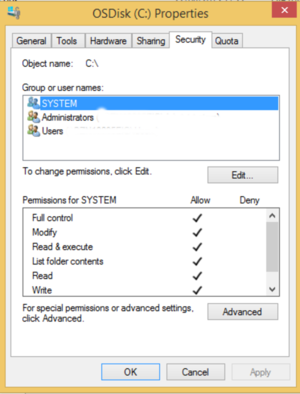
Microsoft Windows Permissions
The r.green modules are based on Python libraries. The module r.green.install -i is able to download and install them. However, some troubles can raise due to new links or versions. In this case, you can manually download the following libraries in your GRASS installation directory from https://www.lfd.uci.edu/\~gohlke/pythonlibs/ according with your GRASS download (32bit or 64bit):
| 32bit | 64bit |
|---|---|
| numpy-1.11.0b3+mkl-cp27-cp27m-win32.whl | numpy-1.11.0b3+mkl-cp27-cp27m-win_amd64.whl |
| scipy-0.17.0-cp27-none-win32.whl | scipy-0.17.0-cp27-none-win_amd64.whl |
| numexpr-2.5-cp27-cp27m-win32.whl | numexpr-2.5-cp27-cp27m-win_amd64.whl |
After the downloading, in the grass Command Console use the following code to install libraries and the r.green menu:
r.green.install -i
Check the list of suggested libraries with the previous table. If they agree, you can proceed with the installation. If you install the Energy menu, use the following command:
r.green.install -x
Close GRASS and restart the programm to have in the the menu the session energy with all the r.green modules.
SEE ALSO
r.green - overview page
AUTHOR
Pietro Zambelli (Eurac Research, Bolzano, Italy)
SOURCE CODE
Available at: r.green.install source code
(history)
Latest change: Monday Jun 22 12:53:40 2026 in commit 425b037