i.omnicloudmask
Predict cloud and cloud-shadow classes with OmniCloudMask from GRASS rasters or a multiband GeoTIFF.
i.omnicloudmask [-clnmr] [red=name] [green=name] [nir=name] [geotiff=name] [geotiff_band_order=string] output=name [patch_size=integer] [patch_overlap=integer] [batch_size=integer] [inference_device=string] [mosaic_device=string] [inference_dtype=string] [no_data_value=float] [compile_mode=string] [model_version=string] [destination_model_dir=name] [model_download_source=string] [memory=integer] [nprocs=integer] [--overwrite] [--verbose] [--quiet] [--qq] [--ui]
Example:
i.omnicloudmask red=name output=name
grass.tools.Tools.i_omnicloudmask(red=None, green=None, nir=None, geotiff=None, geotiff_band_order="1,2,4", output, patch_size=1000, patch_overlap=300, batch_size=1, inference_device="auto", mosaic_device="auto", inference_dtype="fp32", no_data_value=0, compile_mode="default", model_version=None, destination_model_dir=None, model_download_source="hugging_face", memory=300, nprocs=1, flags=None, overwrite=None, verbose=None, quiet=None, superquiet=None)
Example:
tools = Tools()
tools.i_omnicloudmask(red="name", output="name")
This grass.tools API is experimental in version 8.5 and expected to be stable in version 8.6.
grass.script.run_command("i.omnicloudmask", red=None, green=None, nir=None, geotiff=None, geotiff_band_order="1,2,4", output, patch_size=1000, patch_overlap=300, batch_size=1, inference_device="auto", mosaic_device="auto", inference_dtype="fp32", no_data_value=0, compile_mode="default", model_version=None, destination_model_dir=None, model_download_source="hugging_face", memory=300, nprocs=1, flags=None, overwrite=None, verbose=None, quiet=None, superquiet=None)
Example:
gs.run_command("i.omnicloudmask", red="name", output="name")
Parameters
red=name
Red band raster
Name of input raster map
green=name
Green band raster
Name of input raster map
nir=name
NIR band raster
Name of input raster map
geotiff=name
Input GeoTIFF
Optional alternative to red,green,nir input rasters. When used, the whole GeoTIFF is processed with omnicloudmask.predict_from_load_func() and imported into GRASS.
geotiff_band_order=string
band order
Comma-separated band numbers for Red,Green,NIR for GeoTIFF input
Default: 1,2,4
output=name [required]
Output raster or basename
Output class raster name, or basename for confidence rasters when -c is used. Class values are 0=Clear, 1=Thick Cloud, 2=Thin Cloud, 3=Cloud Shadow.
patch_size=integer
Patch size for inference
Default: 1000
patch_overlap=integer
Overlap between adjacent patches
Default: 300
batch_size=integer
Number of patches per inference batch
Default: 1
inference_device=string
Device for inference
Allowed values: auto, cpu, cuda, mps
Default: auto
mosaic_device=string
Device for mosaicking patches
Allowed values: auto, cpu, cuda, mps
Default: auto
inference_dtype=string
Inference data type
Allowed values: fp32, fp16, bf16
Default: fp32
no_data_value=float
Value indicating no-data pixels in input
Default: 0
compile_mode=string
torch.compile mode passed to OmniCloudMask
Default: default
model_version=string
OmniCloudMask model version. Latest is used when omitted.
Allowed values: 1.0, 2.0, 3.0, 4.0
destination_model_dir=name
Directory for cached OmniCloudMask models
Name of input directory
model_download_source=string
Model download source
Allowed values: hugging_face, google_drive
Default: hugging_face
memory=integer
Maximum memory in MB for r.in.gdal when importing GeoTIFF outputs into GRASS
Default: 300
nprocs=integer
Number of threads for r.mapcalc parallel computing (used with -l)
Default: 1
-c
Export confidence rasters
Creates four confidence rasters named from output= with suffixes clear, thick_cloud, thin_cloud, cloud_shadow.
-l
Low-memory mode for confidence output
Computes softmax normalization in GRASS (r.mapcalc) instead of on the inference device. Use this if GPU or system memory is insufficient for the built-in softmax. Only relevant with -c.
-n
Do not apply OmniCloudMask no-data masking
By default, no-data regions are masked in the output.
-m
Compile models with torch.compile
May improve runtime after compilation overhead.
-r
Limit output GeoTIFF import to current region
Passed to r.in.gdal only when importing GeoTIFF outputs from the file-based workflow.
--overwrite
Allow output files to overwrite existing files
--help
Print usage summary
--verbose
Verbose module output
--quiet
Quiet module output
--qq
Very quiet module output
--ui
Force launching GUI dialog
red : str | np.ndarray, optional
Red band raster
Name of input raster map
Used as: input, raster, name
green : str | np.ndarray, optional
Green band raster
Name of input raster map
Used as: input, raster, name
nir : str | np.ndarray, optional
NIR band raster
Name of input raster map
Used as: input, raster, name
geotiff : str, optional
Input GeoTIFF
Optional alternative to red,green,nir input rasters. When used, the whole GeoTIFF is processed with omnicloudmask.predict_from_load_func() and imported into GRASS.
Used as: input, file, name
geotiff_band_order : str, optional
band order
Comma-separated band numbers for Red,Green,NIR for GeoTIFF input
Default: 1,2,4
output : str | type(np.ndarray) | type(np.array) | type(gs.array.array), required
Output raster or basename
Output class raster name, or basename for confidence rasters when -c is used. Class values are 0=Clear, 1=Thick Cloud, 2=Thin Cloud, 3=Cloud Shadow.
Used as: output, raster, name
patch_size : int, optional
Patch size for inference
Default: 1000
patch_overlap : int, optional
Overlap between adjacent patches
Default: 300
batch_size : int, optional
Number of patches per inference batch
Default: 1
inference_device : str, optional
Device for inference
Allowed values: auto, cpu, cuda, mps
Default: auto
mosaic_device : str, optional
Device for mosaicking patches
Allowed values: auto, cpu, cuda, mps
Default: auto
inference_dtype : str, optional
Inference data type
Allowed values: fp32, fp16, bf16
Default: fp32
no_data_value : float, optional
Value indicating no-data pixels in input
Default: 0
compile_mode : str, optional
torch.compile mode passed to OmniCloudMask
Default: default
model_version : str, optional
OmniCloudMask model version. Latest is used when omitted.
Allowed values: 1.0, 2.0, 3.0, 4.0
destination_model_dir : str, optional
Directory for cached OmniCloudMask models
Name of input directory
Used as: input, dir, name
model_download_source : str, optional
Model download source
Allowed values: hugging_face, google_drive
Default: hugging_face
memory : int, optional
Maximum memory in MB for r.in.gdal when importing GeoTIFF outputs into GRASS
Default: 300
nprocs : int, optional
Number of threads for r.mapcalc parallel computing (used with -l)
Default: 1
flags : str, optional
Allowed values: c, l, n, m, r
c
Export confidence rasters
Creates four confidence rasters named from output= with suffixes clear, thick_cloud, thin_cloud, cloud_shadow.
l
Low-memory mode for confidence output
Computes softmax normalization in GRASS (r.mapcalc) instead of on the inference device. Use this if GPU or system memory is insufficient for the built-in softmax. Only relevant with -c.
n
Do not apply OmniCloudMask no-data masking
By default, no-data regions are masked in the output.
m
Compile models with torch.compile
May improve runtime after compilation overhead.
r
Limit output GeoTIFF import to current region
Passed to r.in.gdal only when importing GeoTIFF outputs from the file-based workflow.
overwrite : bool, optional
Allow output files to overwrite existing files
Default: None
verbose : bool, optional
Verbose module output
Default: None
quiet : bool, optional
Quiet module output
Default: None
superquiet : bool, optional
Very quiet module output
Default: None
Returns:
result : grass.tools.support.ToolResult | np.ndarray | tuple[np.ndarray] | None
If the tool produces text as standard output, a ToolResult object will be returned. Otherwise, None will be returned. If an array type (e.g., np.ndarray) is used for one of the raster outputs, the result will be an array and will have the shape corresponding to the computational region. If an array type is used for more than one raster output, the result will be a tuple of arrays.
Raises:
grass.tools.ToolError: When the tool ended with an error.
red : str, optional
Red band raster
Name of input raster map
Used as: input, raster, name
green : str, optional
Green band raster
Name of input raster map
Used as: input, raster, name
nir : str, optional
NIR band raster
Name of input raster map
Used as: input, raster, name
geotiff : str, optional
Input GeoTIFF
Optional alternative to red,green,nir input rasters. When used, the whole GeoTIFF is processed with omnicloudmask.predict_from_load_func() and imported into GRASS.
Used as: input, file, name
geotiff_band_order : str, optional
band order
Comma-separated band numbers for Red,Green,NIR for GeoTIFF input
Default: 1,2,4
output : str, required
Output raster or basename
Output class raster name, or basename for confidence rasters when -c is used. Class values are 0=Clear, 1=Thick Cloud, 2=Thin Cloud, 3=Cloud Shadow.
Used as: output, raster, name
patch_size : int, optional
Patch size for inference
Default: 1000
patch_overlap : int, optional
Overlap between adjacent patches
Default: 300
batch_size : int, optional
Number of patches per inference batch
Default: 1
inference_device : str, optional
Device for inference
Allowed values: auto, cpu, cuda, mps
Default: auto
mosaic_device : str, optional
Device for mosaicking patches
Allowed values: auto, cpu, cuda, mps
Default: auto
inference_dtype : str, optional
Inference data type
Allowed values: fp32, fp16, bf16
Default: fp32
no_data_value : float, optional
Value indicating no-data pixels in input
Default: 0
compile_mode : str, optional
torch.compile mode passed to OmniCloudMask
Default: default
model_version : str, optional
OmniCloudMask model version. Latest is used when omitted.
Allowed values: 1.0, 2.0, 3.0, 4.0
destination_model_dir : str, optional
Directory for cached OmniCloudMask models
Name of input directory
Used as: input, dir, name
model_download_source : str, optional
Model download source
Allowed values: hugging_face, google_drive
Default: hugging_face
memory : int, optional
Maximum memory in MB for r.in.gdal when importing GeoTIFF outputs into GRASS
Default: 300
nprocs : int, optional
Number of threads for r.mapcalc parallel computing (used with -l)
Default: 1
flags : str, optional
Allowed values: c, l, n, m, r
c
Export confidence rasters
Creates four confidence rasters named from output= with suffixes clear, thick_cloud, thin_cloud, cloud_shadow.
l
Low-memory mode for confidence output
Computes softmax normalization in GRASS (r.mapcalc) instead of on the inference device. Use this if GPU or system memory is insufficient for the built-in softmax. Only relevant with -c.
n
Do not apply OmniCloudMask no-data masking
By default, no-data regions are masked in the output.
m
Compile models with torch.compile
May improve runtime after compilation overhead.
r
Limit output GeoTIFF import to current region
Passed to r.in.gdal only when importing GeoTIFF outputs from the file-based workflow.
overwrite : bool, optional
Allow output files to overwrite existing files
Default: None
verbose : bool, optional
Verbose module output
Default: None
quiet : bool, optional
Quiet module output
Default: None
superquiet : bool, optional
Very quiet module output
Default: None
DESCRIPTION
The i.omnicloudmask is a GRASS addon that provides an interface to the OmniCloudMask (OCM) deep learning model for cloud and cloud shadow detection in optical satellite imagery.
OmniCloudMask (OCM) is a sensor-agnostic deep learning model that segments clouds and cloud shadows developed by Nicholas Wright and Jordan A. Caraballo-Vega (2025). It demonstrates robust state-of-the-art performance across various satellite platforms when classifying clear, cloud, and shadow classes. The model was designed to generalise across sensors, spatial resolutions, and processing levels, reducing the need for sensor-specific cloud masking models.
This addon integrates OmniCloudMask into GRASS workflows, allowing users to run cloud masking directly on GRASS raster data or on external multiband GeoTIFF files.
With the GRASS raster workflow, the user provides three input rasters representing the Red, Green, and NIR bands. The cloud detection will be done for the current region.
With the GeoTIFF workflow, the user provides a multiband GeoTIFF. The module will call omnicloudmask direcly to process the scene, and import the resulting rasters into GRASS. This will always be done for the whole GeoTIFF scene.
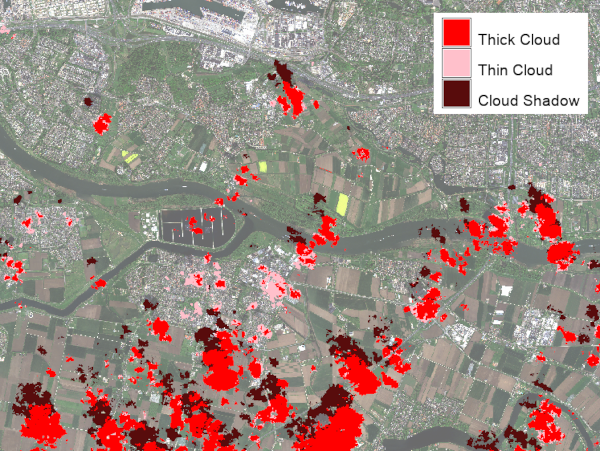
By default, the module produces a categorical prediction raster with the following class values:
- 0 = Clear
- 1 = Thick Cloud
- 2 = Thin Cloud
- 3 = Cloud Shadow
With the -c flag, the module creates confidence rasters instead of the categorical prediction. In that case, four rasters are created using the output parameter as basename, with suffixes _clear, _thick_cloud, _thin_cloud, and _cloud_shadow.
NOTES
This addon requires the opens-source Python package omnicloudmask to be installed in the Python environment used by GRASS GIS. For installation instructions, usage examples, and background information, see the OmniCloudMask documentation.
By default, softmax normalization of confidence rasters is performed by OmniCloudMask using the GPU, if available. On systems with limited GPU memory, this can cause out-of-memory errors, particularly during the patch mosaicking stage.
Possible strategies are, in order of preference:
- Set mosaic_device=cpu to move only the mosaicking step to system RAM while keeping neural network inference on the GPU.
- Use inference_dtype=fp16 to halve GPU memory usage during inference.
- If RAM is limited, the -l flag can be set. If set, the softmax normalization will be done in GRASS, which can handle very large rasters. Use the nprocs option to set the number of threads used for this computation.
EXAMPLES
1: Predict cloud classes from GRASS rasters
i.omnicloudmask \
  red=band_red \
  green=band_green \
  nir=band_nir \
  output=cloudmask
This creates the categorical raster cloudmask in the current mapset, with category labels: Clear, Thick Cloud, Thin Cloud, and Cloud Shadow.
2: Create confidence rasters from GRASS rasters
i.omnicloudmask -c \
  red=band_red \
  green=band_green \
  nir=band_nir \
  output=cloudconf
This creates four confidence rasters: cloudconf_clear, cloudconf_thick_cloud, cloudconf_thin_cloud, and cloudconf_cloud_shadow.
3: Predict cloud classes from a multiband GeoTIFF
i.omnicloudmask \
  geotiff=/path/to/scene.tif \
  geotiff_band_order=3,2,4 \
  output=cloudmask
This processes the whole GeoTIFF scene using OmniCloudMask, imports the prediction raster into GRASS GIS, and removes the temporary exported GeoTIFF. The example assumes that the Red, Green, and NIR bands are stored in bands 3, 2, and 4 of the input file.
4: Create confidence rasters from a multiband GeoTIFF
i.omnicloudmask -c \
  geotiff=/path/to/scene.tif \
  output=cloudconf
This creates four confidence rasters in the current mapset after importing the multiband confidence GeoTIFF produced by OmniCloudMask.
REFERENCES
- Wright, N., Duncan, J. M. A., Callow, J. N., Thompson, S. E., & George, R. J. (2025). Training sensor-agnostic deep learning models for remote sensing: Achieving state-of-the-art cloud and cloud shadow identification with OmniCloudMask. Remote Sensing of Environment, 322, 114694. https://doi.org/10.1016/j.rse.2025.114694.
- OmniCloudMask documentation
- OmniCloudMask repository
SEE ALSO
i.sentinel.mask, i.sentinel.import, i.landsat.qa
AUTHOR
Paulo van Breugel, HAS green academy, Innovative Biomonitoring research group, Climate-robust Landscapes research group
SOURCE CODE
Available at: i.omnicloudmask source code
(history)
Latest change: Sunday Jun 21 23:37:38 2026 in commit 52f83de