r.upflowlength
Calculates upstream flow length from a flow direction raster map using the Memory-Efficient Upstream Flow Length (MEUFL) OpenMP parallel algorithm by Cho (2026).
r.upflowlength input=name format=string [encoding=string] output=name [nprocs=integer] [--overwrite] [--verbose] [--quiet] [--qq] [--ui]
Example:
r.upflowlength input=name format=auto output=name
grass.tools.Tools.r_upflowlength(input, format="auto", encoding=None, output, nprocs=0, overwrite=None, verbose=None, quiet=None, superquiet=None)
Example:
tools = Tools()
tools.r_upflowlength(input="name", format="auto", output="name")
This grass.tools API is experimental in version 8.5 and expected to be stable in version 8.6.
grass.script.run_command("r.upflowlength", input, format="auto", encoding=None, output, nprocs=0, overwrite=None, verbose=None, quiet=None, superquiet=None)
Example:
gs.run_command("r.upflowlength", input="name", format="auto", output="name")
Parameters
input=name [required]
Name of input flow direction raster map
format=string [required]
Format of input flow direction raster map
Allowed values: auto, degree, 45degree, power2, taudem, custom
Default: auto
auto: auto-detect direction format except taudem
degree: degrees CCW from East
45degree: degrees CCW from East divided by 45 (e.g. r.watershed)
power2: powers of 2 CW from East (e.g., r.terraflow, ArcGIS)
taudem: 1-8 for E-SE CCW, not auto-detected (e.g., TauDEM D8FlowDir)
custom: use encoding
encoding=string
Flow direction encoding for custom format
Eight integers for E,SE,S,SW,W,NW,N,NE
output=name [required]
Name for output longest flow paths vector map
nprocs=integer
Number of threads for parallel computing
0: use OpenMP default; >0: use nprocs; <0: use MAX-nprocs
Default: 0
--overwrite
Allow output files to overwrite existing files
--help
Print usage summary
--verbose
Verbose module output
--quiet
Quiet module output
--qq
Very quiet module output
--ui
Force launching GUI dialog
input : str | np.ndarray, required
Name of input flow direction raster map
Used as: input, raster, name
format : str, required
Format of input flow direction raster map
Allowed values: auto, degree, 45degree, power2, taudem, custom
auto: auto-detect direction format except taudem
degree: degrees CCW from East
45degree: degrees CCW from East divided by 45 (e.g. r.watershed)
power2: powers of 2 CW from East (e.g., r.terraflow, ArcGIS)
taudem: 1-8 for E-SE CCW, not auto-detected (e.g., TauDEM D8FlowDir)
custom: use encoding
Default: auto
encoding : str, optional
Flow direction encoding for custom format
Eight integers for E,SE,S,SW,W,NW,N,NE
output : str | type(np.ndarray) | type(np.array) | type(gs.array.array), required
Name for output longest flow paths vector map
Used as: output, raster, name
nprocs : int, optional
Number of threads for parallel computing
0: use OpenMP default; >0: use nprocs; <0: use MAX-nprocs
Default: 0
overwrite : bool, optional
Allow output files to overwrite existing files
Default: None
verbose : bool, optional
Verbose module output
Default: None
quiet : bool, optional
Quiet module output
Default: None
superquiet : bool, optional
Very quiet module output
Default: None
Returns:
result : grass.tools.support.ToolResult | np.ndarray | tuple[np.ndarray] | None
If the tool produces text as standard output, a ToolResult object will be returned. Otherwise, None will be returned. If an array type (e.g., np.ndarray) is used for one of the raster outputs, the result will be an array and will have the shape corresponding to the computational region. If an array type is used for more than one raster output, the result will be a tuple of arrays.
Raises:
grass.tools.ToolError: When the tool ended with an error.
input : str, required
Name of input flow direction raster map
Used as: input, raster, name
format : str, required
Format of input flow direction raster map
Allowed values: auto, degree, 45degree, power2, taudem, custom
auto: auto-detect direction format except taudem
degree: degrees CCW from East
45degree: degrees CCW from East divided by 45 (e.g. r.watershed)
power2: powers of 2 CW from East (e.g., r.terraflow, ArcGIS)
taudem: 1-8 for E-SE CCW, not auto-detected (e.g., TauDEM D8FlowDir)
custom: use encoding
Default: auto
encoding : str, optional
Flow direction encoding for custom format
Eight integers for E,SE,S,SW,W,NW,N,NE
output : str, required
Name for output longest flow paths vector map
Used as: output, raster, name
nprocs : int, optional
Number of threads for parallel computing
0: use OpenMP default; >0: use nprocs; <0: use MAX-nprocs
Default: 0
overwrite : bool, optional
Allow output files to overwrite existing files
Default: None
verbose : bool, optional
Verbose module output
Default: None
quiet : bool, optional
Quiet module output
Default: None
superquiet : bool, optional
Very quiet module output
Default: None
DESCRIPTION
r.upflowlength calculates upstream flow length using the Memory-Efficient Upstream Flow Length OpenMP parallel algorithm by Cho (2026).
NOTES
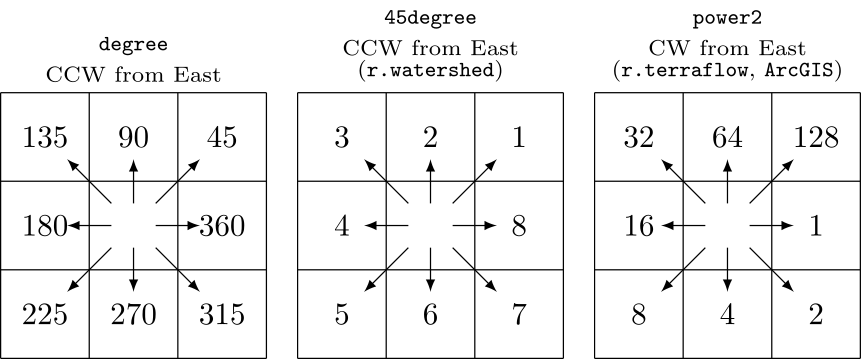
r.upflowlength can automatically recognize the following three different formats of flow directions: degree, 45degree, and power2. The degree format starts just above 0° at East (excluding 0° itself) and goes counterclockwise up to 360°, which also corresponds to East. The 45degree format divides the degree format by 45°. The power2 format starts from 1 at East and doubles clockwise up to Northeast.
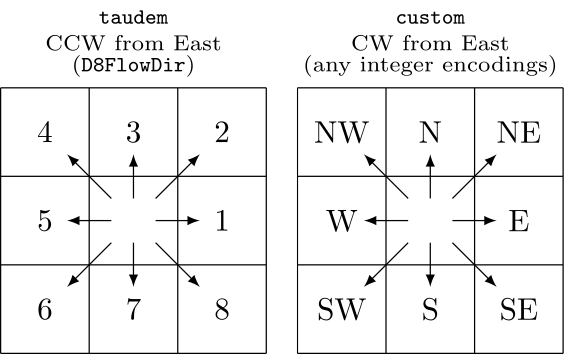
r.upflowlength also supports the taudem format, which is used by TauDEM's D8FlowDir. This format is not auto-detected because it shares the same encoding range of the 45degree format. Additionally, the module can accept any integer encodings with the custom format and encoding option, which uses eight numbers for E, SE, S, SW, W, NW, N, and NE. For example, to encode the 45degree format using this method, one can use format=custom encoding=8,7,6,5,4,3,2,1.
When parallel processing is enabled with the nprocs option, r.upflowlength uses OpenMP's shared-memory model and the specified number of threads to parallelize the computation.
EXAMPLES
These examples use the North Carolina sample dataset.
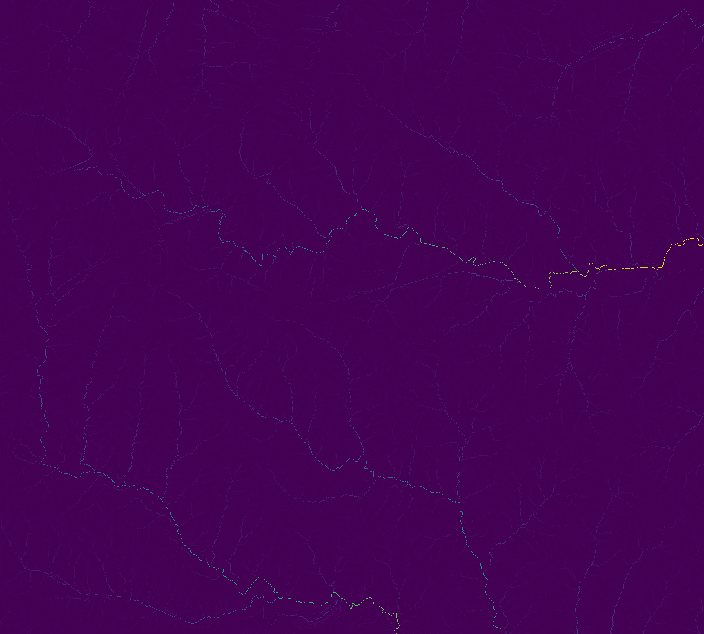
Extract all draining cells (all outlets for the elevation raster), and calculate all watersheds and longest flow paths:
# set computational region
g.region -ap rast=elevation

# calculate drainage directions using r.watershed
r.watershed -s elev=elevation drain=drain

# calculate upstream flow length
r.upflowlength input=drain output=uflen

# or using a custom format for r.watershed drainage (8-1 for E-NE CW)
r.upflowlength input=drain format=custom encoding=8,7,6,5,4,3,2,1 output=uflen2
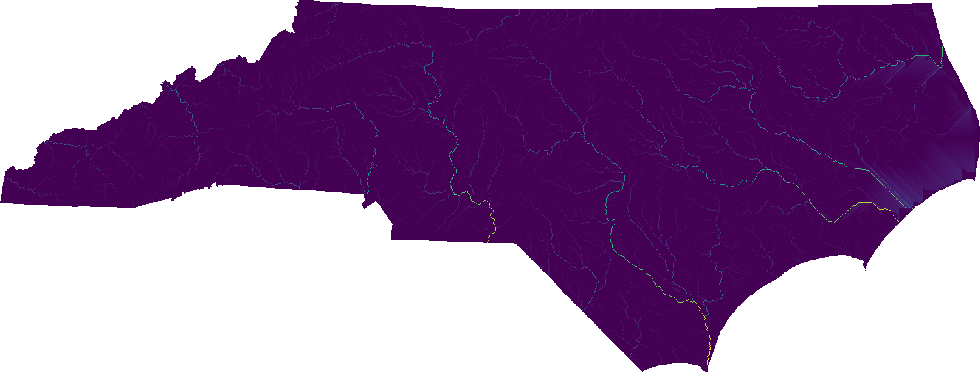
Perform the same analysis using the statewide DEM, elev_state_500m:
# set computational region
g.region -ap rast=elev_state_500m

# calculate drainage directions using r.watershed
r.watershed -s elev=elev_state_500m drain=nc_drain

# calculate upstream flow length
r.upflowlength input=nc_drain output=nc_uflen

# or using a custom format for r.watershed drainage (8-1 for E-NE CW)
r.upflowlength input=nc_drain format=custom encoding=8,7,6,5,4,3,2,1 output=nc_uflen2
SEE ALSO
r.hydrobasin, r.lfp, r.flowaccumulation, r.accumulate, r.watershed
REFERENCES
Huidae Cho, September 2026. Flow in Float: Memory-Efficient Upstream Flow Length Parallel Computation Using an IEEE-754-Based Union Encoding. Environmental Modelling & Software 204, 107045. doi:10.1016/j.envsoft.2026.107045.
AUTHOR
Huidae Cho (HydroCS, New Mexico State University)
SOURCE CODE
Available at: r.upflowlength source code
(history)
Latest change: Wednesday Jun 17 14:05:16 2026 in commit 2b69c1e