r.futures.simulation
Simulates landuse change using FUTure Urban-Regional Environment Simulation (FUTURES).
Module uses Patch-Growing Algorithm (PGA) to simulate urban-rural landscape structure development.
r.futures.simulation [-s] developed=name subregions=name [subregions_potential=name] predictors=name [,name,...] development_pressure=name n_dev_neighbourhood=integer development_pressure_approach=string gamma=float scaling_factor=float output=name [output_series=basename] devpot_params=name demand=name [population_demand=name] [separator=character] patch_sizes=name [redistribution_matrix=name] [redistribution_output=name] [hand=name] [hand_percentile=integer] [flood_maps_file=name] [flood_logfile=name] [huc=name] [adaptive_capacity=name] [adaptation=name] [output_adaptation=basename] [depth_damage_functions=name] [ddf_subregions=name] [response_func=vuln_a,vuln_b,resil_a,resil_b [,vuln_a,vuln_b,resil_a,resil_b,...]] [response_stddev=float] num_neighbors=integer discount_factor=float seed_search=string compactness_mean=float compactness_range=float [num_steps=integer] [potential_weight=name] [zoning=name] [zoning_effects=name] [incentive_power=float] [random_seed=integer] [memory=float] [--overwrite] [--verbose] [--quiet] [--qq] [--ui]
Example:
r.futures.simulation developed=name subregions=name predictors=name development_pressure=name n_dev_neighbourhood=0 development_pressure_approach=gravity gamma=0.0 scaling_factor=0.0 output=name devpot_params=name demand=name patch_sizes=name num_neighbors=4 discount_factor=0.0 seed_search=probability compactness_mean=0.0 compactness_range=0.0 random_seed=0
grass.tools.Tools.r_futures_simulation(developed, subregions, subregions_potential=None, predictors, development_pressure, n_dev_neighbourhood, development_pressure_approach="gravity", gamma, scaling_factor, output, output_series=None, devpot_params, demand, population_demand=None, separator="comma", patch_sizes, redistribution_matrix=None, redistribution_output=None, hand=None, hand_percentile=None, flood_maps_file=None, flood_logfile=None, huc=None, adaptive_capacity=None, adaptation=None, output_adaptation=None, depth_damage_functions=None, ddf_subregions=None, response_func=None, response_stddev=None, num_neighbors=4, discount_factor, seed_search="probability", compactness_mean, compactness_range, num_steps=None, potential_weight=None, zoning=None, zoning_effects=None, incentive_power=1, random_seed=None, memory=None, flags=None, overwrite=None, verbose=None, quiet=None, superquiet=None)
Example:
tools = Tools()
tools.r_futures_simulation(developed="name", subregions="name", predictors="name", development_pressure="name", n_dev_neighbourhood=0, development_pressure_approach="gravity", gamma=0.0, scaling_factor=0.0, output="name", devpot_params="name", demand="name", patch_sizes="name", num_neighbors=4, discount_factor=0.0, seed_search="probability", compactness_mean=0.0, compactness_range=0.0, random_seed=0)
This grass.tools API is experimental in version 8.5 and expected to be stable in version 8.6.
grass.script.run_command("r.futures.simulation", developed, subregions, subregions_potential=None, predictors, development_pressure, n_dev_neighbourhood, development_pressure_approach="gravity", gamma, scaling_factor, output, output_series=None, devpot_params, demand, population_demand=None, separator="comma", patch_sizes, redistribution_matrix=None, redistribution_output=None, hand=None, hand_percentile=None, flood_maps_file=None, flood_logfile=None, huc=None, adaptive_capacity=None, adaptation=None, output_adaptation=None, depth_damage_functions=None, ddf_subregions=None, response_func=None, response_stddev=None, num_neighbors=4, discount_factor, seed_search="probability", compactness_mean, compactness_range, num_steps=None, potential_weight=None, zoning=None, zoning_effects=None, incentive_power=1, random_seed=None, memory=None, flags=None, overwrite=None, verbose=None, quiet=None, superquiet=None)
Example:
gs.run_command("r.futures.simulation", developed="name", subregions="name", predictors="name", development_pressure="name", n_dev_neighbourhood=0, development_pressure_approach="gravity", gamma=0.0, scaling_factor=0.0, output="name", devpot_params="name", demand="name", patch_sizes="name", num_neighbors=4, discount_factor=0.0, seed_search="probability", compactness_mean=0.0, compactness_range=0.0, random_seed=0)
Parameters
developed=name [required]
Raster map of developed areas (=1), undeveloped (=0) and excluded (no data)
subregions=name [required]
Raster map of subregions
subregions_potential=name
Raster map of subregions used with potential file
If not specified, the raster specified in subregions parameter is used
predictors=name [,name,...] [required]
Names of predictor variable raster maps
Listed in the same order as in the development potential table
development_pressure=name [required]
Raster map of development pressure
n_dev_neighbourhood=integer [required]
Size of square used to recalculate development pressure
development_pressure_approach=string [required]
Approaches to derive development pressure
Allowed values: occurrence, gravity, kernel
Default: gravity
gamma=float [required]
Influence of distance between neighboring cells
scaling_factor=float [required]
Scaling factor of development pressure
output=name [required]
State of the development at the end of simulation
output_series=basename
Basename for raster maps of development generated after each step
Name for output basename raster map(s)
devpot_params=name [required]
CSV file with development potential parameters for each region
Each line should contain region ID followed by parameters (intercepts, development pressure, other predictors).
demand=name [required]
CSV file with number of cells to convert for each step and subregion
population_demand=name
CSV file with population size to accommodate
separator=character
Field separator
Separator used in input CSV files
Default: comma
patch_sizes=name [required]
File containing list of patch sizes to use
redistribution_matrix=name
Matrix containing probabilities of moving from one subregion to another
redistribution_output=name
Base name for output file containing matrix of pixels moved from one subregion to another
hand=name
Height Above Nearest Drainage raster
hand_percentile=integer
Percentile of HAND values within inundated area for depth estimation
Allowed values: 0-100
flood_maps_file=name
CSV file with (step, return period, map of depth) or (step, map of return period)
flood_logfile=name
CSV file with (step, HUC ID, flood probability)
huc=name
Raster of HUCs
adaptive_capacity=name
Adaptive capacity raster
adaptation=name
Raster map of current adaptations for specific flood return periods (e.g. 5, 20)
Name of input raster map
output_adaptation=basename
Basename for raster maps of adaptation generated after each step
Name for output basename raster map(s)
depth_damage_functions=name
CSV file with depth-damage function
ddf_subregions=name
Subregions raster for depth-damage functions
response_func=vuln_a,vuln_b,resil_a,resil_b [,vuln_a,vuln_b,resil_a,resil_b,...]
Coefficients of linear functions for flood response
response_stddev=float
Standard deviation of stochastic response adjustment
Flood response is adjusted stochastically by ading a random number N(0, stddev).
Allowed values: 0-1
num_neighbors=integer [required]
The number of neighbors to be used for patch generation (4 or 8)
Allowed values: 4, 8
Default: 4
discount_factor=float [required]
Discount factor of patch size
seed_search=string [required]
The way location of a seed is determined (1: uniform distribution 2: development probability)
Allowed values: random, probability
Default: probability
compactness_mean=float [required]
Mean value of patch compactness to control patch shapes
compactness_range=float [required]
Range of patch compactness to control patch shapes
num_steps=integer
Number of steps to be simulated
potential_weight=name
Raster map of weights altering development potential
Values need to be between -1 and 1, where negative locally reducesprobability and positive increases probability.
zoning=name
Raster map of zoning districts used to alter development potential
Values indicating zoning district. Values should either relate to what is included in zoning_effects file or should be values from 100-302 to align with predefined zoning districts (see documentation for more details.)
zoning_effects=name
CSV file with zoning effects per region
Each line should contain region ID followed by a stringency value per region and effects for each unique zoning district. If you do not wish to apply stringency effect, set stringency value to 1. If zoning districts are excluded, predefined effects will be applied for each zoning district.
incentive_power=float
Exponent to transform probability values p to p^x to simulate infill vs. sprawl
Values > 1 encourage infill, < 1 urban sprawl
Allowed values: 0-10
Default: 1
random_seed=integer
Seed for random number generator
The same seed can be used to obtain same results or random seed can be generated by other means.
memory=float
Memory in GB
-s
Generate random seed (result is non-deterministic)
Automatically generates random seed for random number generator (use when you don't want to provide the seed option)
--overwrite
Allow output files to overwrite existing files
--help
Print usage summary
--verbose
Verbose module output
--quiet
Quiet module output
--qq
Very quiet module output
--ui
Force launching GUI dialog
developed : str | np.ndarray, required
Raster map of developed areas (=1), undeveloped (=0) and excluded (no data)
Used as: input, raster, name
subregions : str | np.ndarray, required
Raster map of subregions
Used as: input, raster, name
subregions_potential : str | np.ndarray, optional
Raster map of subregions used with potential file
If not specified, the raster specified in subregions parameter is used
Used as: input, raster, name
predictors : str | list[str], required
Names of predictor variable raster maps
Listed in the same order as in the development potential table
Used as: input, raster, name
development_pressure : str | np.ndarray, required
Raster map of development pressure
Used as: input, raster, name
n_dev_neighbourhood : int, required
Size of square used to recalculate development pressure
development_pressure_approach : str, required
Approaches to derive development pressure
Allowed values: occurrence, gravity, kernel
Default: gravity
gamma : float, required
Influence of distance between neighboring cells
scaling_factor : float, required
Scaling factor of development pressure
output : str | type(np.ndarray) | type(np.array) | type(gs.array.array), required
State of the development at the end of simulation
Used as: output, raster, name
output_series : str | type(np.ndarray) | type(np.array) | type(gs.array.array), optional
Basename for raster maps of development generated after each step
Name for output basename raster map(s)
Used as: output, raster, basename
devpot_params : str | io.StringIO, required
CSV file with development potential parameters for each region
Each line should contain region ID followed by parameters (intercepts, development pressure, other predictors).
Used as: input, file, name
demand : str | io.StringIO, required
CSV file with number of cells to convert for each step and subregion
Used as: input, file, name
population_demand : str | io.StringIO, optional
CSV file with population size to accommodate
Used as: input, file, name
separator : str, optional
Field separator
Separator used in input CSV files
Used as: input, separator, character
Default: comma
patch_sizes : str | io.StringIO, required
File containing list of patch sizes to use
Used as: input, file, name
redistribution_matrix : str | io.StringIO, optional
Matrix containing probabilities of moving from one subregion to another
Used as: input, file, name
redistribution_output : str, optional
Base name for output file containing matrix of pixels moved from one subregion to another
Used as: output, file, name
hand : str | np.ndarray, optional
Height Above Nearest Drainage raster
Used as: input, raster, name
hand_percentile : int, optional
Percentile of HAND values within inundated area for depth estimation
Allowed values: 0-100
flood_maps_file : str | io.StringIO, optional
CSV file with (step, return period, map of depth) or (step, map of return period)
Used as: input, file, name
flood_logfile : str, optional
CSV file with (step, HUC ID, flood probability)
Used as: output, file, name
huc : str | np.ndarray, optional
Raster of HUCs
Used as: input, raster, name
adaptive_capacity : str | np.ndarray, optional
Adaptive capacity raster
Used as: input, raster, name
adaptation : str | np.ndarray, optional
Raster map of current adaptations for specific flood return periods (e.g. 5, 20)
Name of input raster map
Used as: input, raster, name
output_adaptation : str | type(np.ndarray) | type(np.array) | type(gs.array.array), optional
Basename for raster maps of adaptation generated after each step
Name for output basename raster map(s)
Used as: output, raster, basename
depth_damage_functions : str | io.StringIO, optional
CSV file with depth-damage function
Used as: input, file, name
ddf_subregions : str | np.ndarray, optional
Subregions raster for depth-damage functions
Used as: input, raster, name
response_func : list[tuple[float, float, float, float]] | tuple[float, float, float, float] | list[float] | str, optional
Coefficients of linear functions for flood response
Used as: vuln_a,vuln_b,resil_a,resil_b
response_stddev : float, optional
Standard deviation of stochastic response adjustment
Flood response is adjusted stochastically by ading a random number N(0, stddev).
Allowed values: 0-1
num_neighbors : int, required
The number of neighbors to be used for patch generation (4 or 8)
Allowed values: 4, 8
Default: 4
discount_factor : float, required
Discount factor of patch size
seed_search : str, required
The way location of a seed is determined (1: uniform distribution 2: development probability)
Allowed values: random, probability
Default: probability
compactness_mean : float, required
Mean value of patch compactness to control patch shapes
compactness_range : float, required
Range of patch compactness to control patch shapes
num_steps : int, optional
Number of steps to be simulated
potential_weight : str | np.ndarray, optional
Raster map of weights altering development potential
Values need to be between -1 and 1, where negative locally reducesprobability and positive increases probability.
Used as: input, raster, name
zoning : str | np.ndarray, optional
Raster map of zoning districts used to alter development potential
Values indicating zoning district. Values should either relate to what is included in zoning_effects file or should be values from 100-302 to align with predefined zoning districts (see documentation for more details.)
Used as: input, raster, name
zoning_effects : str | io.StringIO, optional
CSV file with zoning effects per region
Each line should contain region ID followed by a stringency value per region and effects for each unique zoning district. If you do not wish to apply stringency effect, set stringency value to 1. If zoning districts are excluded, predefined effects will be applied for each zoning district.
Used as: input, file, name
incentive_power : float, optional
Exponent to transform probability values p to p^x to simulate infill vs. sprawl
Values > 1 encourage infill, < 1 urban sprawl
Allowed values: 0-10
Default: 1
random_seed : int, optional
Seed for random number generator
The same seed can be used to obtain same results or random seed can be generated by other means.
memory : float, optional
Memory in GB
flags : str, optional
Allowed values: s
s
Generate random seed (result is non-deterministic)
Automatically generates random seed for random number generator (use when you don't want to provide the seed option)
overwrite : bool, optional
Allow output files to overwrite existing files
Default: None
verbose : bool, optional
Verbose module output
Default: None
quiet : bool, optional
Quiet module output
Default: None
superquiet : bool, optional
Very quiet module output
Default: None
Returns:
result : grass.tools.support.ToolResult | np.ndarray | tuple[np.ndarray] | None
If the tool produces text as standard output, a ToolResult object will be returned. Otherwise, None will be returned. If an array type (e.g., np.ndarray) is used for one of the raster outputs, the result will be an array and will have the shape corresponding to the computational region. If an array type is used for more than one raster output, the result will be a tuple of arrays.
Raises:
grass.tools.ToolError: When the tool ended with an error.
developed : str, required
Raster map of developed areas (=1), undeveloped (=0) and excluded (no data)
Used as: input, raster, name
subregions : str, required
Raster map of subregions
Used as: input, raster, name
subregions_potential : str, optional
Raster map of subregions used with potential file
If not specified, the raster specified in subregions parameter is used
Used as: input, raster, name
predictors : str | list[str], required
Names of predictor variable raster maps
Listed in the same order as in the development potential table
Used as: input, raster, name
development_pressure : str, required
Raster map of development pressure
Used as: input, raster, name
n_dev_neighbourhood : int, required
Size of square used to recalculate development pressure
development_pressure_approach : str, required
Approaches to derive development pressure
Allowed values: occurrence, gravity, kernel
Default: gravity
gamma : float, required
Influence of distance between neighboring cells
scaling_factor : float, required
Scaling factor of development pressure
output : str, required
State of the development at the end of simulation
Used as: output, raster, name
output_series : str, optional
Basename for raster maps of development generated after each step
Name for output basename raster map(s)
Used as: output, raster, basename
devpot_params : str, required
CSV file with development potential parameters for each region
Each line should contain region ID followed by parameters (intercepts, development pressure, other predictors).
Used as: input, file, name
demand : str, required
CSV file with number of cells to convert for each step and subregion
Used as: input, file, name
population_demand : str, optional
CSV file with population size to accommodate
Used as: input, file, name
separator : str, optional
Field separator
Separator used in input CSV files
Used as: input, separator, character
Default: comma
patch_sizes : str, required
File containing list of patch sizes to use
Used as: input, file, name
redistribution_matrix : str, optional
Matrix containing probabilities of moving from one subregion to another
Used as: input, file, name
redistribution_output : str, optional
Base name for output file containing matrix of pixels moved from one subregion to another
Used as: output, file, name
hand : str, optional
Height Above Nearest Drainage raster
Used as: input, raster, name
hand_percentile : int, optional
Percentile of HAND values within inundated area for depth estimation
Allowed values: 0-100
flood_maps_file : str, optional
CSV file with (step, return period, map of depth) or (step, map of return period)
Used as: input, file, name
flood_logfile : str, optional
CSV file with (step, HUC ID, flood probability)
Used as: output, file, name
huc : str, optional
Raster of HUCs
Used as: input, raster, name
adaptive_capacity : str, optional
Adaptive capacity raster
Used as: input, raster, name
adaptation : str, optional
Raster map of current adaptations for specific flood return periods (e.g. 5, 20)
Name of input raster map
Used as: input, raster, name
output_adaptation : str, optional
Basename for raster maps of adaptation generated after each step
Name for output basename raster map(s)
Used as: output, raster, basename
depth_damage_functions : str, optional
CSV file with depth-damage function
Used as: input, file, name
ddf_subregions : str, optional
Subregions raster for depth-damage functions
Used as: input, raster, name
response_func : list[tuple[float, float, float, float]] | tuple[float, float, float, float] | list[float] | str, optional
Coefficients of linear functions for flood response
Used as: vuln_a,vuln_b,resil_a,resil_b
response_stddev : float, optional
Standard deviation of stochastic response adjustment
Flood response is adjusted stochastically by ading a random number N(0, stddev).
Allowed values: 0-1
num_neighbors : int, required
The number of neighbors to be used for patch generation (4 or 8)
Allowed values: 4, 8
Default: 4
discount_factor : float, required
Discount factor of patch size
seed_search : str, required
The way location of a seed is determined (1: uniform distribution 2: development probability)
Allowed values: random, probability
Default: probability
compactness_mean : float, required
Mean value of patch compactness to control patch shapes
compactness_range : float, required
Range of patch compactness to control patch shapes
num_steps : int, optional
Number of steps to be simulated
potential_weight : str, optional
Raster map of weights altering development potential
Values need to be between -1 and 1, where negative locally reducesprobability and positive increases probability.
Used as: input, raster, name
zoning : str, optional
Raster map of zoning districts used to alter development potential
Values indicating zoning district. Values should either relate to what is included in zoning_effects file or should be values from 100-302 to align with predefined zoning districts (see documentation for more details.)
Used as: input, raster, name
zoning_effects : str, optional
CSV file with zoning effects per region
Each line should contain region ID followed by a stringency value per region and effects for each unique zoning district. If you do not wish to apply stringency effect, set stringency value to 1. If zoning districts are excluded, predefined effects will be applied for each zoning district.
Used as: input, file, name
incentive_power : float, optional
Exponent to transform probability values p to p^x to simulate infill vs. sprawl
Values > 1 encourage infill, < 1 urban sprawl
Allowed values: 0-10
Default: 1
random_seed : int, optional
Seed for random number generator
The same seed can be used to obtain same results or random seed can be generated by other means.
memory : float, optional
Memory in GB
flags : str, optional
Allowed values: s
s
Generate random seed (result is non-deterministic)
Automatically generates random seed for random number generator (use when you don't want to provide the seed option)
overwrite : bool, optional
Allow output files to overwrite existing files
Default: None
verbose : bool, optional
Verbose module output
Default: None
quiet : bool, optional
Quiet module output
Default: None
superquiet : bool, optional
Very quiet module output
Default: None
DESCRIPTION
Tool r.futures.simulation is part of FUTURES land change model. This tool uses stochastic Patch-Growing Algorithm (PGA) and a combination of field-based and object-based representations to simulate land changes. PGA simulates undeveloped to developed land change by iterative site selection and a contextually aware region growing mechanism. Simulations of change at each time step feed development pressure back to the POTENTIAL submodel, influencing site suitability for the next step.
Patch growing
Patches are constructed in three steps. First, a potential seed is randomly selected from available cells. In case seed_search is probability, the probability value (based on POTENTIAL) of the seed is tested using Monte Carlo approach, and if it doesn't survive, new potential seed is selected and tested. Second, using a 4- or 8-neighbor (see num_neighbors) search rule PGA grows the patch. PGA decides on the suitability of contiguous cells based on their underlying development potential and distance to the seed adjusted by compactness parameter given in compactness_mean and compactness_range. The size of the patch is determined by randomly selecting a patch size from patch sizes file and multiplied by discount_factor. To find optimal values for patch sizes and compactness, use tool r.futures.calib. Once a cell is converted, it remains developed. PGA continues to grow patches until the per capita land demand is satisfied.
Development pressure
Development pressure is a dynamic spatial variable derived from the patch-building process of PGA and associated with the POTENTIAL submodel. At each time step, PGA updates the POTENTIAL probability surface based on land change, and the new development pressure then affects future land change. The initial development pressure is computed using tool r.futures.devpressure. The same input parameters of this tool (gamma, scaling factor and n_dev_neighbourhood) are then used as input for r.futures.simulation.
Scenarios
Scenarios involving policies that encourage infill versus sprawl can be explored using the incentive_power parameter, which uses a power function to transform the probability in POTENTIAL.
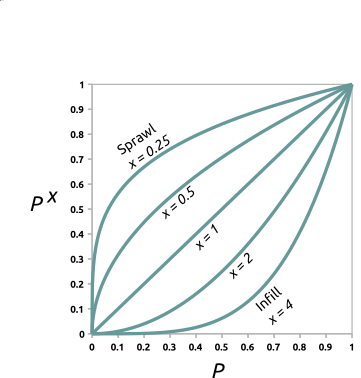
Figure: Transforming development potential surface using incentive
tables with different power functions.
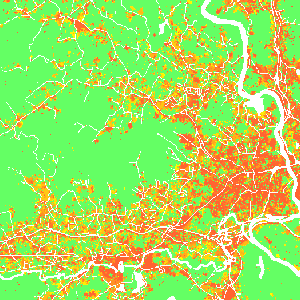
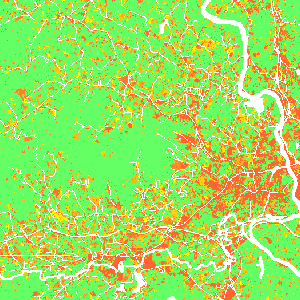
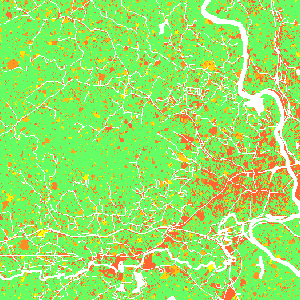
Figure: Effect of incentive table on development probability:
infill (left), status quo (middle), sprawl (right) scenario.
Additionally, parameter potential_weight (raster map from -1 to 1)
enables users to include policies (such as new regulations or fees) which
limit or encourage development in certain areas. Where
potential_weight values are lower than 0, the probability surface is
simply multiplied by the values, which results in decreased site
suitability. Similarly, values greater than 0 result in increased site
suitability. The probability surface is transformed from initial
probability p with value w to p + w - p * w.
Zoning
Parameters zoning (raster containing zoning district IDs) and zoning_effects (table containing zoning effects corresponding to zoning district IDs) enable users to include land use regulations (e.g., zoning) which constrain or incentivize development. zoning can be used alone or in combination with zoning_effects. If zoning_effects is not provided, any or all of the following zoning IDs should be present in the zoning raster and the predefined zoning effects are applied.
| Zoning District | Zoning ID | Zoning Effect |
|---|---|---|
| High-Density Residential | 100 | 0 |
| Medium-High Density Residential | 101 | -0.124 |
| Medium Density Residential | 110 | -0.440 |
| Medium-Low Density Residential | 120 | -0.656 |
| Low-Density Residential | 130 | -0.780 |
| Rural Residential | 131 | -0.790 |
| Commercial | 200 | -0.157 |
| Industrial | 201 | -0.026 |
| Office | 202 | -0.127 |
| Parks and Recreation | 203 | -0.817 |
| Mixed Use | 300 | -0.105 |
| Planned Use | 301 | 0.115 |
| Downtown | 302 | -1 |
| No Zoning | 0 | 0 |
Where zoning effects are lower than 0, site suitability is decreased,
when greater than 0 site suitability is increased. For zoning effect
(w') less than 0, site suitability (p) is adjusted following
p(1 - |w'|). If zoning effects are greater than 0, site suitability is
adjusted following p + w' - p * w'. Note: If part of your study region
does not have zoning, or you do not wish to apply the zoning effect to
part of your study region, you may assign zoning ID 0 to those areas.
Users can also optionally provide unique zoning effects (values between -1 and 1) or regional stringency values (values between 0 and 2) in zoning_effects table. Stringency values adjust the magnitude of the effect of each zoning district by region. Values less than 1 reduce the magnitude of zoning effects while values greater than 1 increase the magnitude. Given zoning effect w and stringency s, adjusted zoning effects w' = max(-1, min(1, w * s)).
Examples of zoning_effects table:
Region_ID values in the first column should align with region IDs in subregions raster and zoning ID column headers should align with zoning IDs in zoning raster.
Providing unique zoning IDs (1, 2) and effects, but no regional stringency (set to 1):
Region_ID,stringency,1,2
1,1,-0.5,0.5
2,1,-0.8,0.3
Using default zoning IDs and effects, but providing regional stringency values:
Region_ID,stringency
1,0.5
2,1.5
Output
After the simulation ends, raster specified in parameter output is written. If optional parameter output_series is specified, additional output is a series of raster maps for each step. Cells with value 0 represents the initial development, values >= 1 then represent the step in which the cell was developed. Undeveloped cells have value -1.
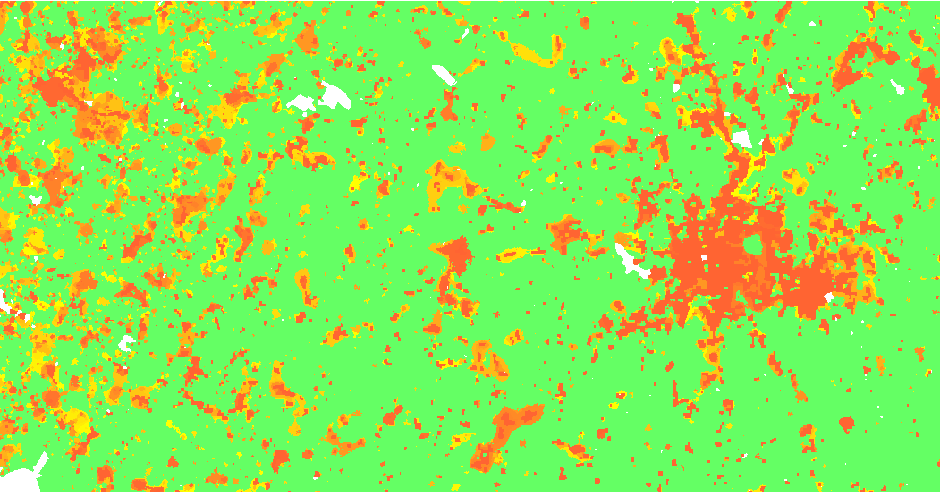
Figure: Output map of developed areas
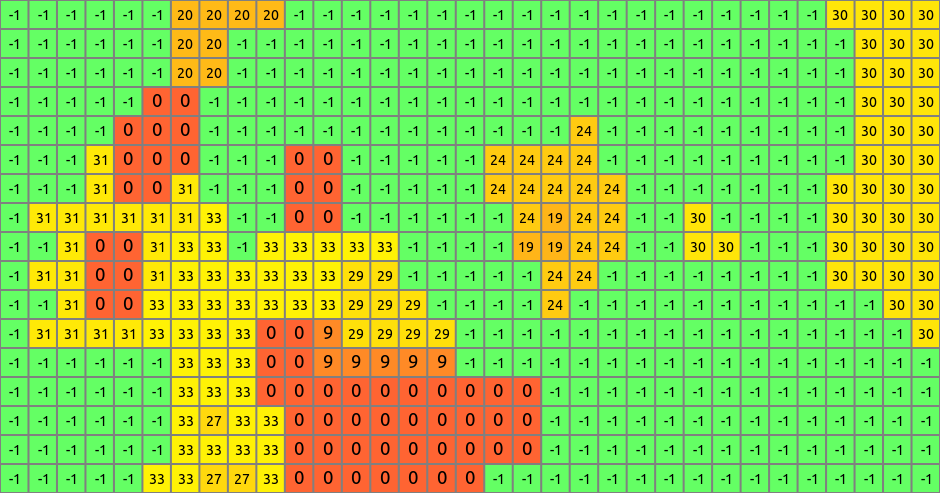
Figure: Detail of output map
Climate forcing
Climate forcing submodel estimates the probability that a developed pixel will experience flood damage and the likely adaptation response (protect and armour, retreat, or stay trapped). Response is based on flood probability, level of damage, and local estimates of adaptive capacity. Climate forcing submodel integrates current and future flood probability and flood depth data with the adaptive capacity of developed pixels to probabilistically predict flood severity and the response evoked by flooding in a developed pixel. The model also predicts the within- or between-county destinations of displaced residents.
The input flood_maps_file includes flood depth data for different flood probabilities for different steps of the simulation:
step,probability,raster
1,0.05,flood_20yr_2020_depth
1,0.01,flood_100yr_2020_depth
1,0.002,flood_500yr_2020_depth
11,0.05,flood_20yr_2030_depth
11,0.01,flood_100yr_2030_depth
11,0.002,flood_500yr_2030_depth
Alternatively, if such detailed data are not available, one can use floodplain raster of given flood return period together with HAND (Height Above Nearest Drainage) raster (hand option) derived from a DEM to estimate flood depth automatically (experimental). Flood probablity raster then contains the probability values (e.g., 0.01 for a 100-yr flood).
step,raster
1,flood_probability_2020
11,flood_probability_2030
Option hand_percentile influences the derived depth, high values (> 90) tend to overestimate the flood depth.
Flood events are stochastically simulated on the level of HUCs (e.g., HUC 12), use huc input option for raster representation of HUCs. Use flood_logfile to log the simulated flood events into a CSV file for further information (step, HUC ID, flood probability).
Once a flood event is simulated, local damage is estimated using flood-damage curves provided in a CSV file in option depth_damage_functions. Its header includes inundation levels in vertical units. The first column is an id of a subregion given in ddf_subregions and the values are percentages of structural damage.
ID,0.3,0.6,0.9
101,0,15,20
102,10,20,30
Once the damage is established, response is stochastically evaluated based on the adaptive_capacity raster with values ranging from -1 (most vulnerable) to 1 (most resilient). Option response_func evaluates the response based on the damage and adaptive capacity, e.g., with high damage vulnerable populations are less likely to protect and armour (adapt) than higly resilient populations. Responses include 1) retreat resulting in pixel abandonment, 2) stay and adapt, and 3) stay trapped. When a pixel is abandoned, the redistribution_matrix is used to decide to which subregion the pixel is moved. It contains probabilities of moving from one subregion to another:
ID,37013,37014,...
37013,0.6,0.01,...
37014,0.05,0.3,...
Output file redistribution_output can be used to log the redistribution happening during the simulation.
EXAMPLE
r.futures.simulation -s developed=lc96 predictors=d2urbkm,d2intkm,d2rdskm,slope \
  demand=demand.txt devpot_params=devpotParams.csv discount_factor=0.6 \
  compactness_mean=0.4 compactness_range=0.08 num_neighbors=4 seed_search=probability \
  patch_sizes=patch_sizes.txt development_pressure=gdp n_dev_neighbourhood=10 \
  development_pressure_approach=gravity gamma=2 scaling_factor=1 \
  subregions=subregions incentive_power=2 \
  potential_weight=weight_1 output=final_results output_series=development
REFERENCES
- Meentemeyer, R. K., Tang, W., Dorning, M. A., Vogler, J. B., Cunniffe, N. J., & Shoemaker, D. A. (2013). FUTURES: Multilevel Simulations of Emerging Urban-Rural Landscape Structure Using a Stochastic Patch-Growing Algorithm. Annals of the Association of American Geographers, 103(4), 785-807. DOI: 10.1080/00045608.2012.707591
- Dorning, M. A., Koch, J., Shoemaker, D. A., & Meentemeyer, R. K. (2015). Simulating urbanization scenarios reveals tradeoffs between conservation planning strategies. Landscape and Urban Planning, 136, 28-39. DOI: 10.1016/j.landurbplan.2014.11.011
- Petrasova, A., Petras, V., Van Berkel, D., Harmon, B. A., Mitasova, H., & Meentemeyer, R. K. (2016). Open Source Approach to Urban Growth Simulation. Int. Arch. Photogramm. Remote Sens. Spatial Inf. Sci., XLI-B7, 953-959. DOI: 10.5194/isprsarchives-XLI-B7-953-2016
- Sanchez, G.M., A. Petrasova, A., M.M. Skrip, E.L. Collins, M.A. Lawrimore, J.B. Vogler, A. Terando, J. Vukomanovic, H. Mitasova, and R.K. Meentemeyer. 2023. Spatially interactive modeling of land change identifies location-specific adaptations most likely to lower future flood risk. Sci Rep 13, 18869. DOI: https://doi.org/10.1038/s41598-023-46195-9
SEE ALSO
FUTURES, r.futures.parallelpga, r.futures.devpressure, r.futures.potential, r.futures.potsurface, r.futures.demand, r.futures.calib, r.futures.gridvalidation, r.futures.validation, r.sample.category
AUTHORS
Corresponding author: Anna Petrasova, akratoc ncsu edu, Center for Geospatial Analytics, NCSU
Original standalone version: Ross K. Meentemeyer, Wenwu Tang, Monica A. Dorning, John B. Vogler, Nik J. Cunniffe, Douglas A. Shoemaker (Department of Geography and Earth Sciences, UNC Charlotte) Jennifer A. Koch (Center for Geospatial Analytics, NCSU)
Port to GRASS and GRASS-specific additions: Vaclav Petras, NCSU GeoForAll
Development pressure, demand, calibration, validation, preprocessing tools and maintenance: Anna Petrasova, NCSU GeoForAll
Climate forcing submodel:
Anna Petrasova,
NCSU GeoForAll
Georgina Sanchez,
Center for Geospatial Analytics, NCSU
Zoning:
Margaret Lawrimore,
Center for Geospatial Analytics, NCSU
Anna Petrasova,
NCSU GeoForAll
SOURCE CODE
Available at: r.futures.simulation source code
(history)
Latest change: Friday Apr 17 16:26:46 2026 in commit bc11ef4