m.cdo.download
Downloads data from NCEI's Climate Data Online (CDO) using their v2 API.
m.cdo.download [-cju] fetch=string [datasetid=string [,string,...]] [datacategoryid=string [,string,...]] [datatypeid=string [,string,...]] [locationcategoryid=string [,string,...]] [locationid=string [,string,...]] [stationid=string [,string,...]] [startdate=string] [enddate=string] [extent=east,north [,east,north,...]] [units=string] [includemetadata=string] [sortfield=string] [sortorder=string] [limit=integer] [offset=integer] [fields=string [,string,...]] [separator=character] [indent=integer] [output=name] [--overwrite] [--verbose] [--quiet] [--qq] [--ui]
Example:
m.cdo.download fetch=data
grass.tools.Tools.m_cdo_download(fetch="data", datasetid=None, datacategoryid=None, datatypeid=None, locationcategoryid=None, locationid=None, stationid=None, startdate=None, enddate=None, extent=None, units="metric", includemetadata="false", sortfield=None, sortorder="asc", limit=0, offset=1, fields=None, separator="pipe", indent=2, output=None, flags=None, overwrite=None, verbose=None, quiet=None, superquiet=None)
Example:
tools = Tools()
tools.m_cdo_download(fetch="data")
This grass.tools API is experimental in version 8.5 and expected to be stable in version 8.6.
grass.script.run_command("m.cdo.download", fetch="data", datasetid=None, datacategoryid=None, datatypeid=None, locationcategoryid=None, locationid=None, stationid=None, startdate=None, enddate=None, extent=None, units="metric", includemetadata="false", sortfield=None, sortorder="asc", limit=0, offset=1, fields=None, separator="pipe", indent=2, output=None, flags=None, overwrite=None, verbose=None, quiet=None, superquiet=None)
Example:
gs.run_command("m.cdo.download", fetch="data")
Parameters
fetch=string [required]
Fetch available metadata or actual data for this specific item
Allowed values: datasets, datacategories, datatypes, locationcategories, locations, stations, data
Default: data
datasetid=string [,string,...]
Dataset ID
datacategoryid=string [,string,...]
Data category ID
datatypeid=string [,string,...]
Data type ID
locationcategoryid=string [,string,...]
Location category ID
locationid=string [,string,...]
Location ID
stationid=string [,string,...]
Station ID
startdate=string
Start date in YYYY-MM-DD or date time in YYYY-MM-DDThh ss (for data only)
enddate=string
End date in YYYY-MM-DD or date time in YYYY-MM-DDThhss (for data only)
extent=east,north [,east,north,...]
Extent in lower-left and upper-right coordinates in degrees
units=string
Units for data (raw for no conversion)
Allowed values: raw, standard, metric
Default: metric
includemetadata=string
Include metadata when actually fetching data (slower)
Allowed values: true, false
Default: false
sortfield=string
Sort field
Allowed values: id, name, mindate, maxdate, datacoverage
sortorder=string
Sort order
Allowed values: asc, desc
Default: asc
limit=integer
Max number of results (0 for unlimited; can be > 1000)
Default: 0
offset=integer
1-based offset for the first result
Default: 1
fields=string [,string,...]
Fields to print
separator=character
Field separator
Special characters: pipe, comma, space, tab, newline
Default: pipe
indent=integer
Indent for JSON format (-1 for single line per record)
Default: 2
output=name
Name for output file
-c
Do not include column names in output
-j
Print output in JSON
-u
Print the request URL and exit
--overwrite
Allow output files to overwrite existing files
--help
Print usage summary
--verbose
Verbose module output
--quiet
Quiet module output
--qq
Very quiet module output
--ui
Force launching GUI dialog
fetch : str, required
Fetch available metadata or actual data for this specific item
Allowed values: datasets, datacategories, datatypes, locationcategories, locations, stations, data
Default: data
datasetid : str | list[str], optional
Dataset ID
datacategoryid : str | list[str], optional
Data category ID
datatypeid : str | list[str], optional
Data type ID
locationcategoryid : str | list[str], optional
Location category ID
locationid : str | list[str], optional
Location ID
stationid : str | list[str], optional
Station ID
startdate : str, optional
Start date in YYYY-MM-DD or date time in YYYY-MM-DDThhss (for data only)
enddate : str, optional
End date in YYYY-MM-DD or date time in YYYY-MM-DDThhss (for data only)
extent : list[tuple[float, float]] | tuple[float, float] | list[float] | str, optional
Extent in lower-left and upper-right coordinates in degrees
Used as: input, coords, east,north
units : str, optional
Units for data (raw for no conversion)
Allowed values: raw, standard, metric
Default: metric
includemetadata : str, optional
Include metadata when actually fetching data (slower)
Allowed values: true, false
Default: false
sortfield : str, optional
Sort field
Allowed values: id, name, mindate, maxdate, datacoverage
sortorder : str, optional
Sort order
Allowed values: asc, desc
Default: asc
limit : int, optional
Max number of results (0 for unlimited; can be > 1000)
Default: 0
offset : int, optional
1-based offset for the first result
Default: 1
fields : str | list[str], optional
Fields to print
separator : str, optional
Field separator
Special characters: pipe, comma, space, tab, newline
Used as: input, separator, character
Default: pipe
indent : int, optional
Indent for JSON format (-1 for single line per record)
Default: 2
output : str, optional
Name for output file
Used as: output, file, name
flags : str, optional
Allowed values: c, j, u
c
Do not include column names in output
j
Print output in JSON
u
Print the request URL and exit
overwrite : bool, optional
Allow output files to overwrite existing files
Default: None
verbose : bool, optional
Verbose module output
Default: None
quiet : bool, optional
Quiet module output
Default: None
superquiet : bool, optional
Very quiet module output
Default: None
Returns:
result : grass.tools.support.ToolResult | None
If the tool produces text as standard output, a ToolResult object will be returned. Otherwise, None will be returned.
Raises:
grass.tools.ToolError: When the tool ended with an error.
fetch : str, required
Fetch available metadata or actual data for this specific item
Allowed values: datasets, datacategories, datatypes, locationcategories, locations, stations, data
Default: data
datasetid : str | list[str], optional
Dataset ID
datacategoryid : str | list[str], optional
Data category ID
datatypeid : str | list[str], optional
Data type ID
locationcategoryid : str | list[str], optional
Location category ID
locationid : str | list[str], optional
Location ID
stationid : str | list[str], optional
Station ID
startdate : str, optional
Start date in YYYY-MM-DD or date time in YYYY-MM-DDThhss (for data only)
enddate : str, optional
End date in YYYY-MM-DD or date time in YYYY-MM-DDThhss (for data only)
extent : list[tuple[float, float]] | tuple[float, float] | list[float] | str, optional
Extent in lower-left and upper-right coordinates in degrees
Used as: input, coords, east,north
units : str, optional
Units for data (raw for no conversion)
Allowed values: raw, standard, metric
Default: metric
includemetadata : str, optional
Include metadata when actually fetching data (slower)
Allowed values: true, false
Default: false
sortfield : str, optional
Sort field
Allowed values: id, name, mindate, maxdate, datacoverage
sortorder : str, optional
Sort order
Allowed values: asc, desc
Default: asc
limit : int, optional
Max number of results (0 for unlimited; can be > 1000)
Default: 0
offset : int, optional
1-based offset for the first result
Default: 1
fields : str | list[str], optional
Fields to print
separator : str, optional
Field separator
Special characters: pipe, comma, space, tab, newline
Used as: input, separator, character
Default: pipe
indent : int, optional
Indent for JSON format (-1 for single line per record)
Default: 2
output : str, optional
Name for output file
Used as: output, file, name
flags : str, optional
Allowed values: c, j, u
c
Do not include column names in output
j
Print output in JSON
u
Print the request URL and exit
overwrite : bool, optional
Allow output files to overwrite existing files
Default: None
verbose : bool, optional
Verbose module output
Default: None
quiet : bool, optional
Quiet module output
Default: None
superquiet : bool, optional
Very quiet module output
Default: None
DESCRIPTION
m.cdo.download downloads data from NCEI's Climate Data Online (CDO) using their v2 API.
NOTES
This module uses the CDO Web Services v2 API to download CDO data.
To access the API services, obtain your CDO API token from the
NCEI CDO Web Services Token Request page
and set it as the CDO_API_TOKENS environment variable. If you have multiple
tokens, separate them with commas. For example:
export CDO_API_TOKENS=aaaaaaaaaaaaaaaaaaaaaaaaaaaaaaaa,bbbbbbbbbbbbbbbbbbbbbbbbbbbbbbbb
EXAMPLES
List available datasets:
m.cdo.download fetch=datasets
List available dataset IDs without column names:
m.cdo.download -c fetch=datasets fields=id
List available stations within (47.5204,-122.2047)-(47.6139,-122.1065):
m.cdo.download fetch=stations extent=47.5204,-122.2047,47.6139,-122.1065
List available "precipitation" and "average temperature" data types:
m.cdo.download fetch=datatypes field=id,mindate,maxdate,name |
grep -i "|precipitation\||average temperature"
List 10 available stations with PRCP and TAVG data starting 2023-01-01:
m.cdo.download fetch=stations datatypeid=PRCP,TAVG startdate=2023-01-01 limit=10
Fetch daily PRCP and TAVG data for a station with mindate ≤ 2023-01-01 and save it into a file:
# find dataset IDs for data types PRCP and TAVG; let's use GHCND (Daily Summary)
m.cdo.download fetch=datasets datatypeid=PRCP,TAVG

# find the first station ID with mindate ≤ 2023-01-01
stationid=$(m.cdo.download -c fetch=stations datatypeid=PRCP,TAVG \
    startdate=2023-01-01 fields=id limit=1)

# fetch actual data and save it to data.txt
m.cdo.download fetch=data datasetid=GHCND datatypeid=PRCP,TAVG \
    stationid=$stationid startdate=2023-01-01 enddate=2023-10-15 \
    output=data.txt
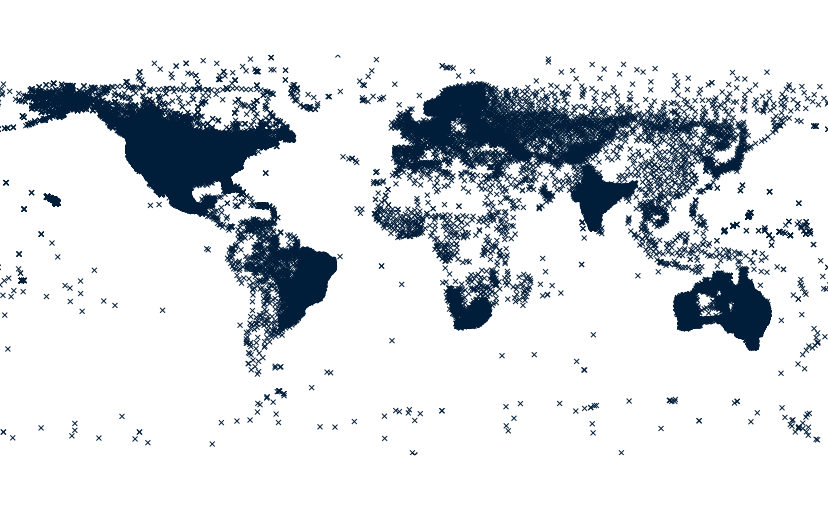
Create a point vector map with all stations:
# from a latlong location

# download metadata for all stations
m.cdo.download stations output=cdo_stations.txt

# import cdo_stations.txt
xy=$(awk -F'|' '{
    if (NR == 1) {
        for (i = 1; i <= NF; i++)
            if ($i == "latitude")
                latind = i
            else if ($i == "longitude")
                lonind = i
        printf "x=%s y=%s", lonind, latind
        exit
    }
}' cdo_stations.txt)
v.in.ascii input=cdo_stations.txt output=cdo_stations skip=1 $xy

# rename columns
old_cols=$(db.columns table=cdo_stations exclude=cat)
new_cols=$(head -1 cdo_stations.txt | sed 's/|/ /g')

for old_new in $(echo $old_cols $new_cols |
    awk '{
        n = NF / 2
        for (i = 1; i <= n; i++)
            printf "%s,%s\n", $i, $(i + n)
    }'); do
    v.db.renamecolumn map=cdo_stations column=$old_new
done
SEE ALSO
AUTHOR
Huidae Cho, New Mexico State University
SOURCE CODE
Available at: m.cdo.download source code
(history)
Latest change: Monday Jun 22 12:53:40 2026 in commit 425b037