r.in.ahn
Imports dtm, dsm or chm from the AHN (Actueel Hoogtebestand Nederland (AHN), versions 2–6.
r.in.ahn [-g] product=string version=string resolution=float output=name [memory=memory in MB] [nprocs=integer] [max_inputs=integer] [--overwrite] [--verbose] [--quiet] [--qq] [--ui]
Example:
r.in.ahn product=dtm version=4 resolution=0.5 output=name
grass.tools.Tools.r_in_ahn(product, version="4", resolution=0.5, output, memory=300, nprocs=0, max_inputs=250, flags=None, overwrite=None, verbose=None, quiet=None, superquiet=None)
Example:
tools = Tools()
tools.r_in_ahn(product="dtm", version="4", resolution=0.5, output="name")
This grass.tools API is experimental in version 8.5 and expected to be stable in version 8.6.
grass.script.run_command("r.in.ahn", product, version="4", resolution=0.5, output, memory=300, nprocs=0, max_inputs=250, flags=None, overwrite=None, verbose=None, quiet=None, superquiet=None)
Example:
gs.run_command("r.in.ahn", product="dtm", version="4", resolution=0.5, output="name")
Parameters
product=string [required]
Product
Choose which product to download (dtm, dsm or chm)
Allowed values: dtm, dsm, chm
version=string [required]
AHN version
AHN version to download
Allowed values: 2, 3, 4, 5, 6
Default: 4
resolution=float [required]
Resolution
Resolution in meters (0.5 or 5)
Allowed values: 0.5, 5
Default: 0.5
output=name [required]
Name for output raster map
memory=memory in MB
Maximum memory to be used (in MB)
Cache size for raster rows
Default: 300
nprocs=integer
Number of threads for parallel computing
0: use OpenMP default; >0: use nprocs; <0: use MAX-nprocs
Default: 0
max_inputs=integer
Maximum number of rasters passed to a single r.patch call
Larger values reduce number of intermediate batches but may exceed OS command length limits
Default: 250
-g
Set to original computational region
After downloading and importing, set the region back to the original computation region.
--overwrite
Allow output files to overwrite existing files
--help
Print usage summary
--verbose
Verbose module output
--quiet
Quiet module output
--qq
Very quiet module output
--ui
Force launching GUI dialog
product : str, required
Product
Choose which product to download (dtm, dsm or chm)
Allowed values: dtm, dsm, chm
version : str, required
AHN version
AHN version to download
Allowed values: 2, 3, 4, 5, 6
Default: 4
resolution : float, required
Resolution
Resolution in meters (0.5 or 5)
Allowed values: 0.5, 5
Default: 0.5
output : str | type(np.ndarray) | type(np.array) | type(gs.array.array), required
Name for output raster map
Used as: output, raster, name
memory : int, optional
Maximum memory to be used (in MB)
Cache size for raster rows
Used as: memory in MB
Default: 300
nprocs : int, optional
Number of threads for parallel computing
0: use OpenMP default; >0: use nprocs; <0: use MAX-nprocs
Default: 0
max_inputs : int, optional
Maximum number of rasters passed to a single r.patch call
Larger values reduce number of intermediate batches but may exceed OS command length limits
Default: 250
flags : str, optional
Allowed values: g
g
Set to original computational region
After downloading and importing, set the region back to the original computation region.
overwrite : bool, optional
Allow output files to overwrite existing files
Default: None
verbose : bool, optional
Verbose module output
Default: None
quiet : bool, optional
Quiet module output
Default: None
superquiet : bool, optional
Very quiet module output
Default: None
Returns:
result : grass.tools.support.ToolResult | np.ndarray | tuple[np.ndarray] | None
If the tool produces text as standard output, a ToolResult object will be returned. Otherwise, None will be returned. If an array type (e.g., np.ndarray) is used for one of the raster outputs, the result will be an array and will have the shape corresponding to the computational region. If an array type is used for more than one raster output, the result will be a tuple of arrays.
Raises:
grass.tools.ToolError: When the tool ended with an error.
product : str, required
Product
Choose which product to download (dtm, dsm or chm)
Allowed values: dtm, dsm, chm
version : str, required
AHN version
AHN version to download
Allowed values: 2, 3, 4, 5, 6
Default: 4
resolution : float, required
Resolution
Resolution in meters (0.5 or 5)
Allowed values: 0.5, 5
Default: 0.5
output : str, required
Name for output raster map
Used as: output, raster, name
memory : int, optional
Maximum memory to be used (in MB)
Cache size for raster rows
Used as: memory in MB
Default: 300
nprocs : int, optional
Number of threads for parallel computing
0: use OpenMP default; >0: use nprocs; <0: use MAX-nprocs
Default: 0
max_inputs : int, optional
Maximum number of rasters passed to a single r.patch call
Larger values reduce number of intermediate batches but may exceed OS command length limits
Default: 250
flags : str, optional
Allowed values: g
g
Set to original computational region
After downloading and importing, set the region back to the original computation region.
overwrite : bool, optional
Allow output files to overwrite existing files
Default: None
verbose : bool, optional
Verbose module output
Default: None
quiet : bool, optional
Quiet module output
Default: None
superquiet : bool, optional
Very quiet module output
Default: None
DESCRIPTION
r.in.ahn imports elevation data from the Actueel Hoogtebestand Nederland (AHN). AHN is the national digital elevation model of the Netherlands and provides both a digital terrain model (DTM) and a digital surface model (DSM) at resolutions of 0.5 m and 5 m. The dataset is available in multiple versions (AHN2 through AHN6), each corresponding to a different acquisition period and processing specification. An overview of these versions is provided on the AHN website.
The user specifies the AHN version, the product (dtm, dsm, chm), and the desired resolution. When chm is selected, the module first downloads and imports both the DTM and DSM and then computes the canopy height model (CHM) as the difference between DSM and DTM. In this case, all three layers are retained and written to the mapset using the user-defined output name with the suffixes _dtm, _dsm, and _chm.
The module determines which 1 × 1 km tiles intersect the current computational region, downloads the required tiles, imports them into the GRASS mapset and combines them in one layer. During this process, the computational region is (temporarily) adjusted so that the imported raster aligns with the native AHN grid and uses the selected resolution. The resulting raster always covers the original region (or the portion overlapping the AHN extent). When the -g flag is used, the original computational region is restored after the import is completed.
NOTE
This module can only be used in a location based on the Amersfoort / RD New coordinate reference system (EPSG:28992). Running it in a location with a different CRS will result in an error.
The computational region is modified during import to ensure that the resulting raster aligns with the AHN grid and matches the chosen resolution (0.5 m or 5 m). If the -g flag is provided, the region is reset to its original extent after the import.
All AHN versions are provided as 1 × 1 km tiles. Earlier datasets (AHN2–AHN5), originally published as larger map sheets (5 × 6.25 km), have been reprocessed as 1 × 1 km tiles following the AHN6 specification. In the 0.5 m DTM, cell values represent an unweighted average of ground-level points; in the 0.5 m DSM, cell values represent the highest point. The earlier versions retain the original differences related to high-voltage structures: AHN4 DSM excludes high-voltage power lines but includes pylons, while AHN2 and AHN3 DSM include both lines and pylons. See the documentation on the AHN dataroom
The module downloads tiles directly from the AHN object-storage service. The earlier WCS-based download method and the option to retrieve complete map sheets are no longer supported.
If a MASK is present, it is preserved, although, consistent with GRASS behavior, it does not alter the imported DTM or DSM. However, when computing the CHM, the MASK is applied to the DSM–DTM calculation, and the resulting CHM will contain NULL values outside the MASKed area.
Versions 5 and 6 do not cover the whole of the Netherlands yet. Check the AHN website for information about which parts are covered.
EXAMPLES
Example 1
Import the DTM for Fort Crèvecoeur, an fortress where the river Old Dieze flows into the Maas river.
# Set the region for Fort Crèvecoeur
g.region n=416562 s=415957 w=145900 e=147003 res=0.5

# Download the DSM
r.in.ahn product=dtm output=dtm_crevecoeur resolution=0.5 version=4
](r_in_ahn_01.png)
Figure: DTM map of Fort Crèvecoeur
Example 2
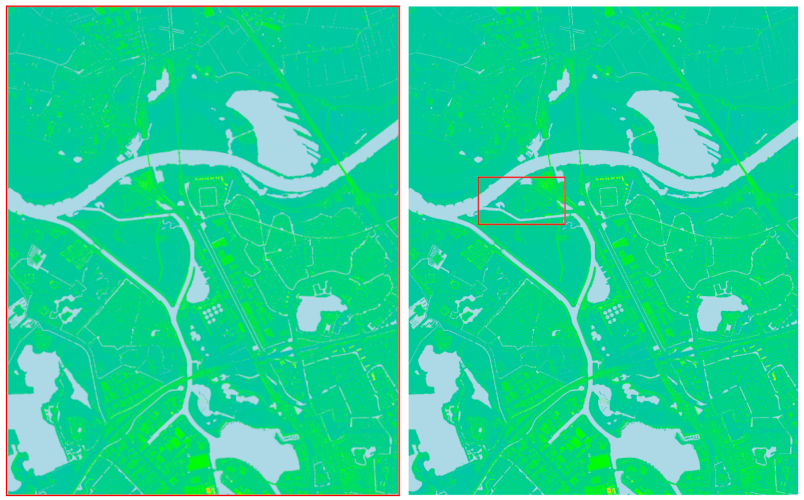
Import the DSM version 5 with a resolution of 5 meter. Set the -g flag to keep the current computation region after importing the requested data. Note, the imported data will still have the resolution of, and will be aligned to, the original AHN data.
# Download the DSM
r.in.ahn -g product=dsm output=dsm_crevecoeur resolution=5 version=5
Example 3
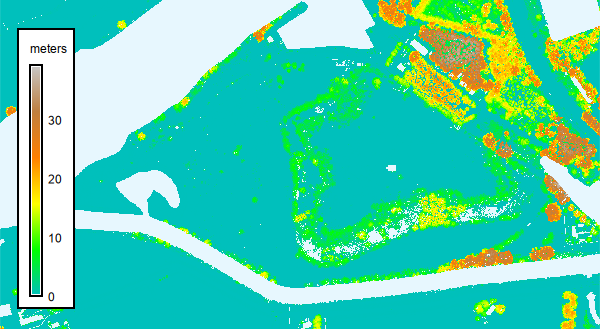
Import the CHM based on version 4 of DTM and DSM with a resolution of 0.5 meter.
r.in.ahn product=chm output=chm_crevecoeur resolution=0.5 version=4
REFERENCES
See the AHN webpage for more information about the AHN data (in Dutch).
SEE ALSO
r.in.srtm, r.in.nasadem, r.in.pdal, v.in.pdal
AUTHOR
Paulo van Breugel | HAS green academy, University of Applied Sciences | Climate-robust Landscapes research group | Innovative Bio-Monitoring research group | Contact: Ecodiv.earth
SOURCE CODE
Available at: r.in.ahn source code
(history)
Latest change: Friday Apr 24 12:41:45 2026 in commit 55ee2dd